Log Analysis on iOS/macOS/visionOS
For logs on native (iOS/macOS), Unity (iOS/macOS/visionOS), and Unity Editor (macOS), refer to the following instructions.
How to Obtain Logs
If you need to analyze an app on an iOS/visionOS device, connect the device to the macOS development device with a USB cable. If you need to analyze an app or program on a macOS device, this step is not required.
On the macOS development device, open Finder -> Applications -> Utilities -> Console. In Console, click Start streaming, then run the program that needs to be analyzed. Open the app or program until logs appear in Console. Right-click the log and select Show Process "<app name>" to view all logs for that app or program process.
The following is an example.
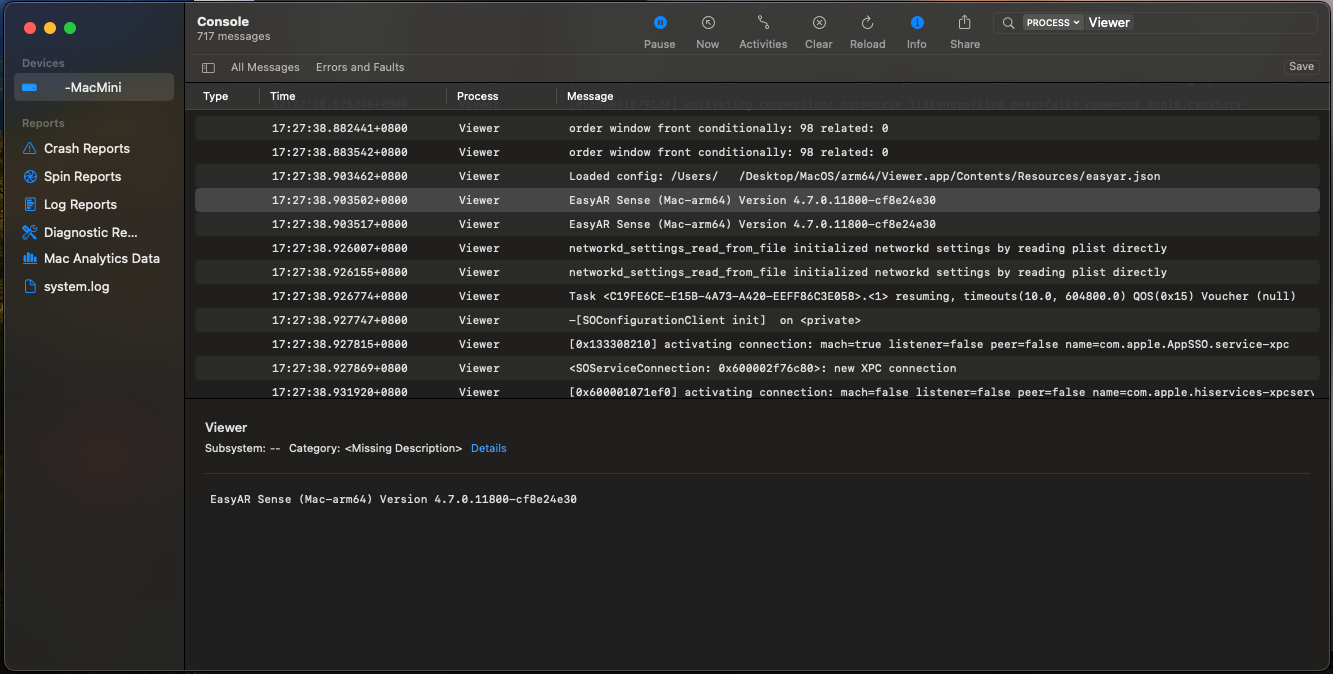
Press Cmd + A to select all logs, then press Cmd + C to copy the logs to the clipboard.
For programs on macOS, if the program is a command-line program, you can also obtain log output from the terminal.
In addition, you can debug the app or program with Xcode and obtain logs from the Xcode log window.
Unity Built-in Logs
When developing apps with Unity, in addition to the platform's built-in log analysis methods, Unity Editor also provides extra debugging methods.
Unity logs are divided into Unity Editor logs and Unity Player logs. You can obtain them in the following ways.
| Unity environment | Operating system | Log path |
|---|---|---|
| Editor | macOS | ~/Library/Logs/Unity/Editor.log |
| Player | iOS | Use Xcode's lldb console |
| Player | macOS | ~/Library/Logs/Company Name/Product Name/Player.log |
The editor log can also be opened with the Open Editor Log command from the menu in the upper-right corner of the Console window.
Understanding Logs
When analyzing errors, you often need to determine the conditions under which the error occurred, such as the called function, parameters, and related state.
Notes for Feedback
EasyAR Sense and EasyAR Sense Unity Plugin version numbers
For example, 4.7.0.11800-cf8e24e30
Community Edition/Enterprise Edition
Platform and CPU architecture
iOS
arm64
macOS
x86_64/arm64
visionOS
arm64