Introduction to planar image tracking
Planar Image Tracking is used to detect and track textured planar objects in daily life. So-called "planar" objects can be small items like books, business cards, or posters, or large targets like graffiti walls. Such objects or scenes have flat surfaces with rich, non-repeating textures.
This article outlines the basic principles, expected effects, and platform adaptation solutions for planar image detection and tracking, helping you quickly understand functional boundaries and development key points.
Basic principles
Understanding these principles helps developers optimize recognition effects and avoid common issues.
Core process
- Loading and preprocessing phase:
- The system loads the target image, extracts numerous visual feature points from it, generates a feature description of the image, and inserts it into the feature library.
- Images with richer textures are easier to recognize and track. You can use the Target Image Detection Tool to check the recognizability of your target image in advance.
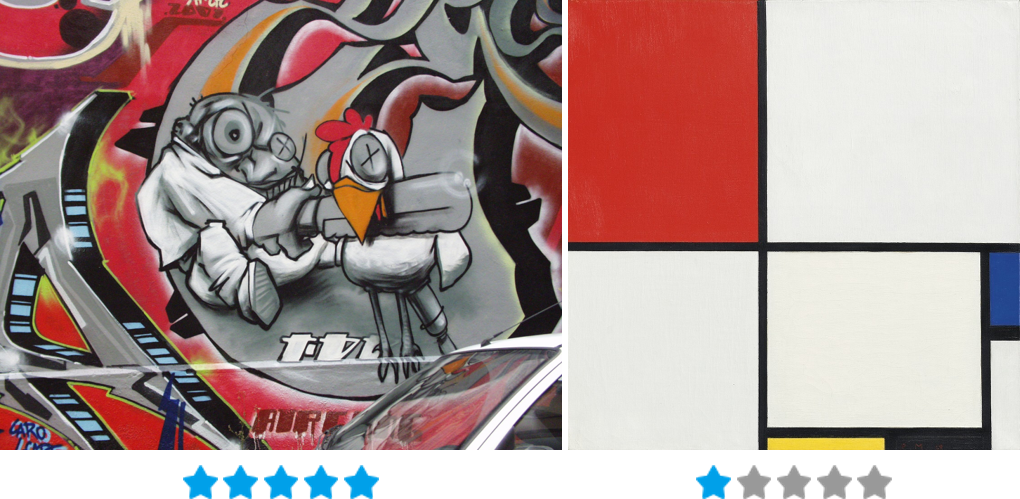
Left: Texture-rich and easily recognizable (5 stars); Right: Simple elements, lacking texture, hard to recognize (1 star). We recommend using images with 4~5-star quality as your target images. 2. Real-time detection and tracking phase:
- After the camera captures the frame, the system analyzes feature points in the current frame and performs feature matching with the target image's feature library.
- Calculates the 3D pose (position + rotation) of the image using the PnP (Perspective-n-Point) algorithm.
- Once the target is successfully detected, the system enters tracking mode. It then compares consecutive frames and analyzes motion between frames to achieve real-time tracking.
- Optimization mechanisms:
- Tracking loss recovery: Automatically redetects targets after brief occlusion or fast motion blur.
- Multi-target simultaneous tracking: Control the concurrency number of a single Tracker through the
Simultaneous Numberparameter, enabling one Tracker call to track multiple targets simultaneously.
Technical limitations
- Only supports planar images (not 3D objects or dynamic content).
- Relies on environmental lighting; environments that are too dark or overexposed may cause detection difficulties or tracking loss.
- During detection, the camera cannot be too far from the target. Ensure the target image occupies at least 30% of the frame.
- Multi-target tracking is limited by device performance. Typically, PC can track over 10 targets simultaneously, while mobile devices can track 4~6 planar targets.
Effects and expected results
Understanding the workflow and technical limitations of image detection and tracking helps set reasonable testing standards during development.
Ideal effects
- Precise overlay: Virtual objects align perfectly with image edges.
- Fast detection: Ultra-low latency from app loading to successful detection.
- Stable tracking: Maintains tracking during rotation, movement, or partial occlusion of the image.
Non-ideal situations and countermeasures
| Phenomenon | Cause | User perception | Solution preview (details in later sections) |
|---|---|---|---|
| Recognition failure | Insufficient texture, target too small | Virtual objects don’t appear | Optimize target image; use tool to check recognizability |
| Tracking jitter | Target occupies too small an area; insufficient trackable points | Obvious shaking of virtual objects | Avoid excessive distance; set tracking mode to PreferQuality |
| Frequent loss | Fast movement or complete occlusion of image | Virtual objects flicker/disappear | Stabilize device/target; increase target size |
| Missing multi-targets | Hardware performance limitations | Some target images fail to track | Set reasonable Simultaneous Number based on performance |
Validation methods for expected results
- Development phase: Preview via Unity editor Play mode using a PC camera.
- Testing phase: Use official Sample scenes or custom test images under various lighting/angle/distance conditions.
Best practices for target images
The effectiveness of planar image tracking heavily depends on target image quality. Follow these guidelines to ensure recognition success.
Depending on the scenario, prepare target images by: photographing objects directly from a frontal angle, or designing patterns for printing. Both photos and designs can serve as template images.
Basic requirements
- Image format: Recommended JPG or PNG.
- Transparency handling: Images with alpha channels are processed as having white backgrounds. Avoid alpha channels if unintended.
Core optimization points
- Ensure rich texture details Template images should have sufficient details and edge variations; avoid solid colors or simple graphics.

Left: Texture-rich images can be detected; Right: Solid-color images cannot be detected 2. Avoid repetitive patterns Regularly repeating patterns (e.g., checkboards, stripes) reduce feature point uniqueness.
Repetitive pattern images cannot be tracked 3. Fill the frame with content The subject should occupy as much of the frame as possible; minimize blank areas.
Left: Full-frame subjects are easier to detect/track than right-side images with excessive whitespace 4. Control aspect ratio Avoid overly narrow images; the shorter side should be at least 20% of the longer side.
Narrow images are difficult to track 5. Select appropriate resolution Recommended range: Between SQCIF (128×96) and QVGA (1280×960). Too small: Insufficient feature points reduce recognition rate. Too large: Unnecessary memory overhead and increased computation time during Target data generation.