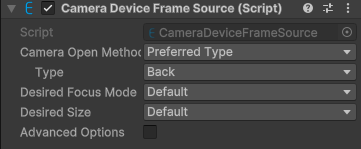
Explore the properties in the CameraDeviceFrameSource component window to customize camera parameters.
Component screenshot under default conditions.
Property
Description
Camera Open Method
Method used when opening a physical camera. Options:
PreferredType (default): Opens the camera device according to camera device type. If no matching type exists, it will try to open the first camera device.
DeviceIndex: Opens the camera device according to camera index.
SpecificType: Opens the camera device according to the exact camera device type. If no matching type exists, it will fail. On Mac, camera type cannot be identified.
Type
Displayed when Camera Open Method is PreferredType or SpecificType. Camera type used when opening a physical camera. Options:
Back (default): Back camera.
Front: Front camera.
Unknown: Unknown position.
Index
Displayed when Camera Open Method is DeviceIndex. Device index used when opening a physical camera.
Desired Focus Mode
Desired focus mode. Options:
Default: Use the default value. The actual selection is related to the AR feature being used.
Input: Use the specified value.
Options available when Input is selected:
Normal: Normal focus mode. In this mode, AutoFocus() must be called to trigger focus.
Continousauto: Continuous autofocus mode.
Infinity: Infinity focus mode.
Macro: Macro focus mode. In this mode, AutoFocus() must be called to trigger focus.
Medium: Medium-distance focus mode.
Desired Size
Desired camera image size. Options:
Default: Use the default value.
Input: Use the specified value.
Advanced Options
Advanced options. Usually no modification is required.