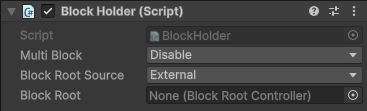
Explore the properties in the BlockHolder component window to customize camera parameters.
Component screenshot under default conditions.
Property
Description
Multi Block
Strategy when multiple blocks are located. Options:
Disable (default): Does not allow multiple blocks. Throws a fatal error if multiple blocks are detected during runtime.
PlayMode: The relative transformation between blocks will be calculated at runtime. Values set (typically) by Mega Studio in edit mode will persist until both related blocks are located.
EditMode: The relative transformation between blocks does not change at runtime and maintains the values set (typically) by Mega Studio in edit mode.
Block Root Source
Source of the block root.
External (default): External, such as nodes generated by Mega Studio or pre-assembled nodes.
Internal: Internal, created by the BlockHolder itself when needed.
Mixed: Mixed, can come from external or internal sources.
Block Root
Parent node of all Mega blocks. It is typically generated by Mega tools. If not set, a new root node will be automatically generated when the first block is held.