BlockRootController component reference
Switch to API
Explore the properties in the BlockRootController component window to customize camera parameters.
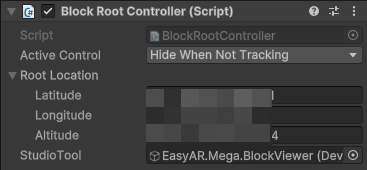
Component screenshot under default conditions.
| Property |
Description |
| Active Control |
Options: - Hide Before First Found: Before first tracking, the GameObject is deactivated; once successfully tracked, the GameObject remains activated.
- Hide When Not Tracking (default): When tracked, the GameObject is activated; when tracking is lost, the GameObject is deactivated.
- None: Does not control the activation state of the GameObject.
|
| Root Location |
GNSS (GPS, BeiDou, etc.) information of the Block Root.
It only has a value in the following two cases: - During editing, when one of its block models is imported from Mega Studio and the block data contains GPS information;
- During runtime, when actively calling BlockHolder.Hold(BlockController.BlockInfo, Location) to hold a block.
|
| Latitude |
Latitude. |
| Longitude |
Longitude. |
| Altitude |
Altitude. |
| Studio Tool |
The Studio tool currently controlling the block, only used to indicate the tool in edit mode. |