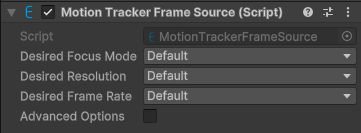
Explore the properties in the MotionTrackerFrameSource component window to customize camera and motion tracking parameters.
Component screenshot under default conditions.
Property
Description
Desired Focus Mode
Desired focus mode. Options:
Default: Use the default value. The actual selection is related to the AR feature being used.
Input: Use the specified value.
Options available when Input is selected:
Continousauto: Continuous autofocus mode, with high image sharpness and average tracking effect. The actual focus effect depends on device capability.
Medium: Fixed-focus mode at medium distance, with average image sharpness and better tracking effect. The actual focus effect depends on device capability.
Desired Resolution
Desired resolution. Options:
Default: Use the default value.
Input: Use the specified value.
Options available when Input is selected:
Resolution_1280: The standard resolution is 1280 x 960 or 1280 x 720. The actual resolution depends on device capability.
Resolution_640: The standard resolution is 640 x 480 or 640 x 360. The actual resolution depends on device capability.
Desired Frame Rate
Desired camera image frame rate. Options:
Default: Use the default value.
Input: Use the specified value.
Options available when Input is selected:
Camera_FPS_30: The device image frame rate is 30fps. The actual frame rate depends on device capability.
Camera_FPS_60: The device image frame rate is 60fps or 30fps. The actual frame rate depends on device capability.
Advanced Options
Advanced options. Usually no modification is required.
Desired Min Quality Level
Desired minimum allowed quality level. Options:
Default: Use the default value.
Input: Use the specified value.
Options available when Input is selected:
NotSupported: The device does not support motion tracking, possibly because adaptation does not meet the standard or has not yet been completed.
Bad: The device does not fully meet the standard, with unstable scale. It can be used for small scenes within desktop scale.
Limited: The device does not fully meet the standard, with scale close to accurate. It can be used for medium scenes within room scale, such as AR games and AR navigation.
Good: The device meets the standard, with accurate scale. It can be used for large scenes at building scale, such as AR games, AR navigation, and 3D reconstruction.
Desired Tracking Mode
Desired tracking mode. Options:
Default: Use the default value.
Input: Use the specified value.
Options available when Input is selected:
VIO: Only tracking and tap-hit point cloud are available, with low CPU and memory usage, but plane detection, relocalization, and anchors are not supported.
SLAM: Tracking and mapping are performed at the same time. Relocalization after loss, tap-hit point cloud, and plane detection are supported, but anchors are not available, real-time pose correction is not supported, and CPU and memory usage are slightly higher.
Anchor: Tracking and mapping are performed at the same time. Relocalization after loss, tap-hit point cloud, plane detection, and anchors are supported, but CPU and memory usage are the highest.
LargeScale: Suitable for large scenes. Tracking and mapping are performed at the same time, and relocalization after loss, tap-hit point cloud, plane detection, and anchors are supported. Tracking is more stable with large depth of field.
Camera Candidate
Alternative for Camera. Effective only when Unity XR Origin is not used. If not set, Camera.main will be used.