Mega Real - world Mesh Anomaly Troubleshooting Guide
In the development of the Mega application, the placement of virtual content is achieved through Mesh. The visual effects, accuracy, etc. of the Mesh model will affect the placement accuracy of virtual content and even the final Mega positioning effect. This article will explain some visual effect and accuracy issues that the Mesh model may encounter, helping you to correctly distinguish model defects and identify serious problems for feedback.
What is a Mesh Model
Mega Mesh is a three - dimensional geometric model reconstructed from the collected environmental data. Its main function is to provide a real physical reference for virtual content, enabling virtual objects to be correctly occluded by real - world objects such as walls, floors, tables, and chairs, thus achieving a more realistic virtual - real fusion experience.
The Mega Mesh model is automatically reconstructed from the collected videos through cloud algorithms, not manually and finely modeled. Therefore, it naturally has certain flaws.
Correct expectations:
The overall color is basically consistent with the real environment, and the colors of large - area walls, floors, and object bodies are correct.
The textures of the main structures are recognizable (such as floor tile patterns, wallpaper designs, and exhibit appearances).
The model can provide a good light - shadow and color fusion effect in AR. Slight flaws are completely normal, and common situations include:
In areas with complex lighting, the texture colors may have abnormal phenomena such as being too dark, too bright, or having a color cast.
For distant objects or edge areas, the textures may be slightly blurred or stretched.
Mega provides an LOD model, and there may be inconsistent texture colors between LOD blocks.
At the splicing points of different perspectives, there may be small - area texture misalignments or seams.
The details of small objects such as text and signs may not be clear.
Slight afterimages or color stains may be left by dynamic objects such as people and vehicles.
For transparent and reflective objects such as glass and water surfaces, there may be structural missing or depressions.
The walls or floors are not perfectly flat, with tiny bumps or "burrs".
There are small holes in the model. These flaws usually do not seriously affect your experience and are reasonable limitations of the automatic reconstruction algorithm, so no special treatment is required.
Which Model Anomalies Need to be Handled
The following situations are serious defects that will directly affect the application effect and need attention and handling.
| Problem Type | Typical Manifestation | Possible Impact |
|---|---|---|
| Large - area missing or holes | There is no Mesh at all on a non - reflective and non - transparent whole wall, and virtual objects cannot be correctly occluded | Correct occlusion cannot be achieved in this area |
| Large - area structural error | A whole wall is incorrectly reconstructed as slanted, or the room size seriously does not match the actual one | It will cause virtual objects to be misaligned with the real environment, seriously affecting the occlusion effect |
| Severe deformation or skew | The ground is obviously tilted, the walls are distorted, and the object positions are seriously offset | The position of virtual content is disordered, and the occlusion is abnormal |
| Severe noise or speckles | A large number of floating fragments appear in the air | Occlusion flickers and performance decreases |
| Completely wrong in key areas | The Mesh in important interaction areas (such as stairs, exhibition stands, etc.) is completely incorrect | User interaction fails and the experience is damaged |
| Model layering | Layers of the ground or walls are seen at the same location | Occlusion is incorrect and positioning is inaccurate |
| Completely wrong large - area color | Strange colors or completely wrong colors appear in the textures of walls, floors, etc. | The overall environment looks unrealistic and visually discordant |
Problem Handling and Feedback
After encountering the above serious model defect problems, please collect information and provide feedback in the following way to help us quickly locate and fix the problems.
Collect Necessary Information
Screenshots or videos
- Screenshots: At least 3 screenshots from different angles, and mark the problem area.
- Videos: Record a 10 - 30 - second video of the Mesh anomaly area using a mobile phone or computer screen - recording software.
Problem description
When providing feedback on the problem, the following information should be provided:
- Problem scope: Whether the problem exists in the entire map or only in a certain local area.
- Map type: Mega provides several different map - building methods, and the map - building type with problems needs to be specified.
- Problem location and area: The specific location where the problem occurs. For example, there is a problem in the "central exhibition stand on the first - floor hall of the museum" area of a single map, or in a large - scale map, specify where the layering occurs during the fusion between specific sub - maps.
- Problem description: Combine the screenshots or recorded videos to specifically point out the area where the problem occurs and the abnormal phenomena. If it is a multi - map situation, clearly state the names of the sub - maps. For example, "The wall model on the 3rd floor of the office building in XX map on the west corridor is tilted by about 15 degrees" or "Layering occurs between the west side of sub - map A and the east side of sub - map B".
Please do not just say "The model has a problem" or "The Mesh looks bad". The lack of screenshots and specific descriptions will greatly delay the problem - handling time.
Map information
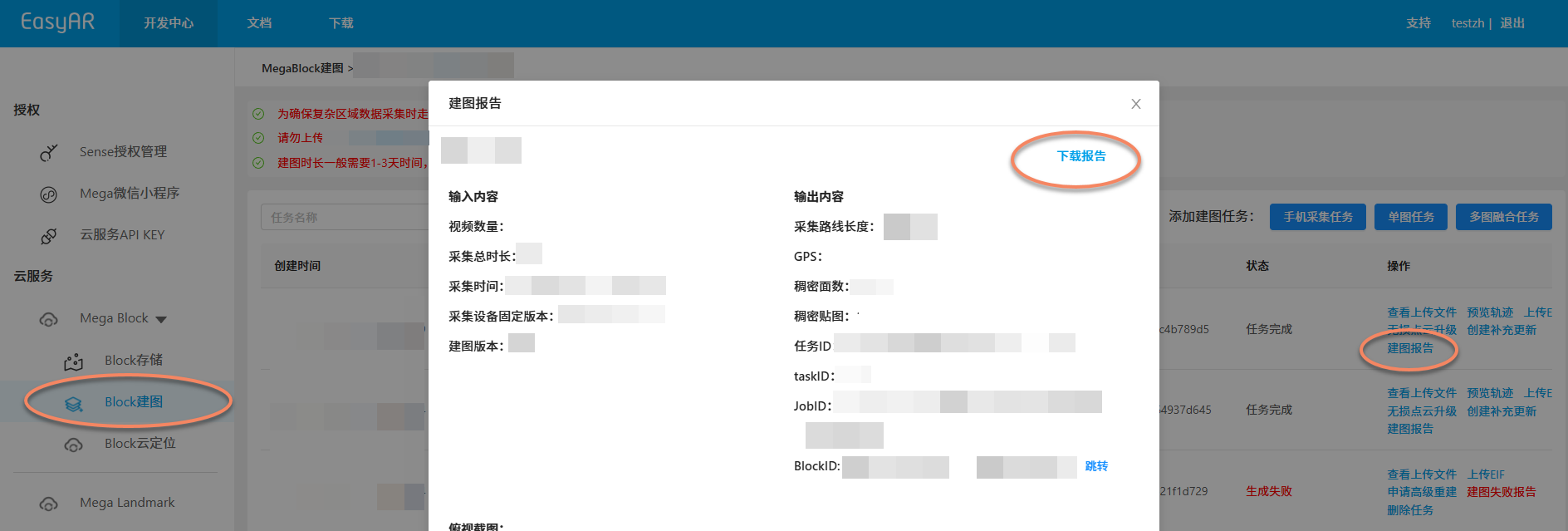
Map - building report: Provide the map - building report of the problem map from Mega Block.
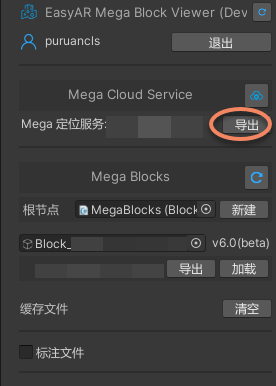
Positioning service information: You can export the positioning service information in Unity.
- Unity development, plugin version >= 4003
- Unity development, plugin version 4.7 - 4002
- Mini - program development
- Other Mega Studio usage scenarios
On the editor tool of the block node you are using, click the
Diagnosis Infobutton in the following figure to export the Mega Block diagnosis information. TheMega Block diagnosis informationonly contains Mega Block and positioning library information and does not contain other sensitive information.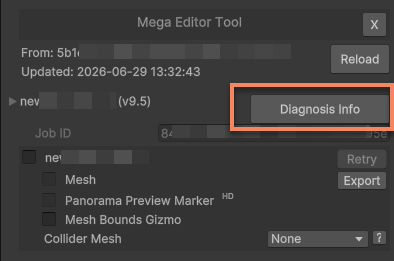
The format of the file you export should be
Mega_Report_Block_<blockID>_YY-MM-DD_HH-MM-SS.json.
Initiate Feedback
Send the screenshots or screen recordings, problem description, and map information to EasyAR staff. After analysis, we will provide you with a feedback on the problem - handling method.
- Handling process: We will check the original collected data and the cloud - reconstruction results based on the materials you provide.
- Possible reasons: It may be due to environmental changes in the area during data collection, problems with the collection device, or limitations of the map - building algorithm in specific scenarios.
- If the data is not collected according to the specifications: We will evaluate whether it is necessary to recollect or supplement the data in this area and rebuild the map.
- If the collected data is normal: There may be deficiencies in the cloud - reconstruction method. We will iterate and optimize it in subsequent versions and provide you with a solution to the problem. Correctly understanding the functions and limitations of the Mesh model, distinguishing between "normal flaws" and "real problems", and providing problem feedback as required are the keys to efficiently solving problems.