Confirm that the recorded data can reproduce your problem
Please collect EIF data that can reproduce the problem. You can then reproduce the relevant problem by simulating the operation of this EIF data in the tool.
Only by providing effective data that can reproduce the problem can we accurately locate and solve the problems you encounter.
Record EIF data
Before starting the recording, please ensure that the selected recording location and environment are convenient for stably reproducing the specific problem you encountered.
You can choose the following corresponding solutions to obtain data according to your current development environment or hardware device:
- Collect EIF data through Toolbox
- Record EIF data through a self-developed app
- Record EIF data through AR glasses
Run the verification tool
Use the session verification tool and select the EIF data that can easily reproduce the problem for simulated operation.
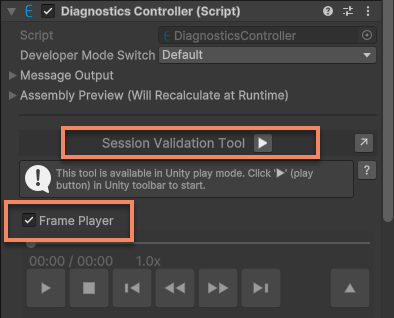
For detailed steps, please refer to Simulate the operation using the session verification tool
Observe whether the abnormal phenomenon is reproduced
Verify whether the problem you encountered in the on-site test can be reproduced by running the EIF file using the session verification tool or Mega Studio.
- If the EIF file can reproduce the problem, please send the file to the EasyAR technical support team.
- If the problem cannot be reproduced, please re-record the EIF file and repeat the above verification steps until the problem is reproduced and then submit the file so that the technical team can locate and solve the problem.
Related topics
Record EIF simulation run data that can reproduce the problem using your app
Record EIF simulation run data that can reproduce the problem on your phone using Mega Toolbox
Record EIF simulation run data that can reproduce the problem on the headset using the example