EasyAR Sense Unity Plugin migration guide
This article describes how to migrate from an older version of the EasyAR Sense Unity Plugin to a new version.
Compatibility notes
Starting from version 4000, the EasyAR Sense Unity Plugin follows the package versioning (using Semantic Versioning) required by Unity, and compatibility can be determined by the version number.
4.7 is a gradual update version, and any two 4.7 versions are incompatible.
For versions before 4.7, only the third version number indicates backward compatibility, and changes to the first two version numbers indicate incompatibility. For example, 4.6.2 is compatible with 4.6.1, but 4.6.0 is incompatible with 4.5.0.
Warning
Modifying the tgz file or failing to update the entire plugin completely after decompression will result in incompatibility.
General migration guide
Migrating to a new version requires first using the Package Manager window to remove the old plugin package and add the new package.
It is recommended to follow these steps:
- Close the Unity instance in use.
- Delete the platform compilation directory generated when Unity packages the application.
- Reopen the Unity project and remove the old version of the EasyAR Sense Unity Plugin from the project.
- Import the new version of the EasyAR Sense Unity Plugin.
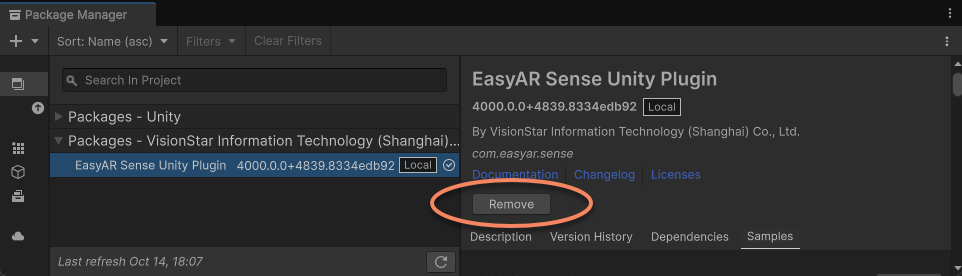
Note
The example files provided by the plugin are not guaranteed to be compatible between versions. After upgrading the plugin, examples imported into the project may not work properly. It is recommended to delete old version examples before proceeding.
EasyAR contains native library files. If library functions were executed before deletion or replacement (which is also called during packaging), these library files will be locked by the system and cannot be deleted or replaced.
Important
Before deleting the old version, ensure that no scenes are running in the editor and no applications for any platform are being packaged. It is generally recommended to close Unity before deleting or replacing the package, and replace it immediately after reopening.
Before repackaging with the new version of the plugin, you need to delete the platform compilation directory generated by Unity packaging, including the Gradle project directory generated for Android and the Xcode directory generated for iOS.
Tip
Usually these directories might be inside the Library folder of the Unity project (e.g., Library/Bee/Android/Prj/IL2CPP/Gradle), but different Unity versions may vary.
If you have packaged but cannot find the directory for the corresponding platform, it is recommended to delete the entire Library folder.
If a SchemaHashNotMatched exception occurs after migration, there are usually two possibilities
- The aforementioned operations were not performed correctly, causing the upgrade to fail or be incomplete, or the compilation directory generated by Unity was not updated correctly (Note: if not manually deleted, it is highly likely to cause an error). It is recommended to follow the suggested steps or recompile using a project without the
Librarycache. - The EasyAR tgz file was manually modified or the entire plugin was not updated completely after decompression. In this case, EasyAR cannot guarantee availability, and you need to re-download the correct package and import it.
Important
Since the library files of EasyAR Sense and the location of the library files after packaging may change, if you have kept the Gradle or Xcode project generated by Unity, you must delete all files related to EasyAR in advance, such as EasyAR.aar, libEasyAR.so, easyar.framework, etc.
Migration to version 4002
When migrating from version 4001 to 4002, in addition to the general migration guide above, you need to pay attention to the following content.
Interface changes
| Functional module | v4001 API | v4002 API | Usage instructions |
|---|---|---|---|
| Auxiliary functions | Image.Image(Buffer, PixelFormat, int, int) | Image.create |
Migration to version 4001
Tip
There are incompatible changes only when using Mega; the use of other functions is not affected.
When migrating from version 4000 to 4001, in addition to the general migration guide above, you need to pay attention to the following content.
Interface changes
| Functional module | v4000 API | v4001 API | Usage instructions |
|---|---|---|---|
| Mega | MegaTrackerFrameFilter.ResultPoseType.EnableLocalization | MegaTrackerFrameFilter.EnableLocalization | Control Mega tracking process |
| Mega | MegaTrackerFrameFilter.ResultPoseType.EnableStabilization | - | Feature removed |
Historical version migration
When migrating from versions before 4000, you need to refer to the following content: