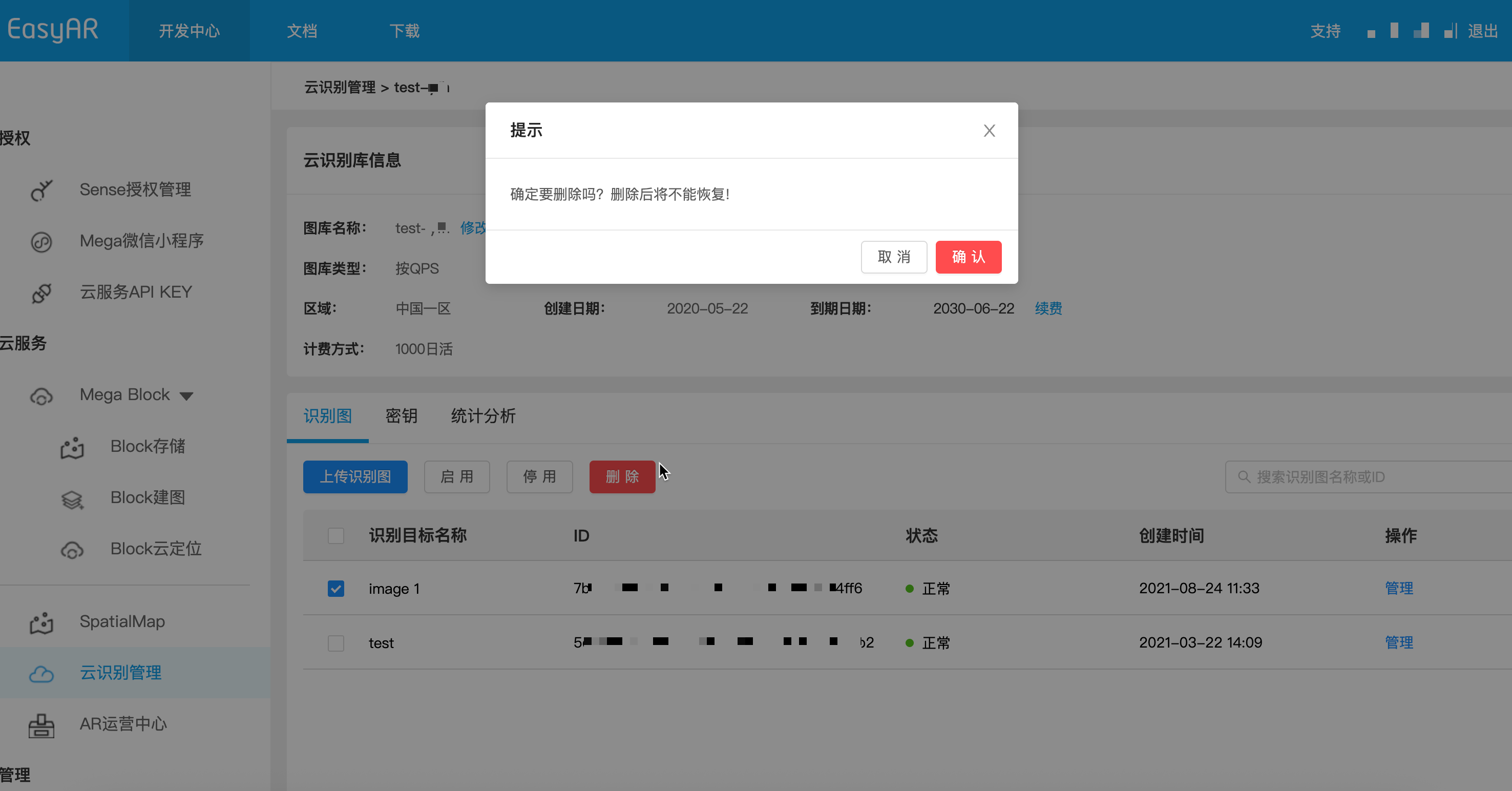
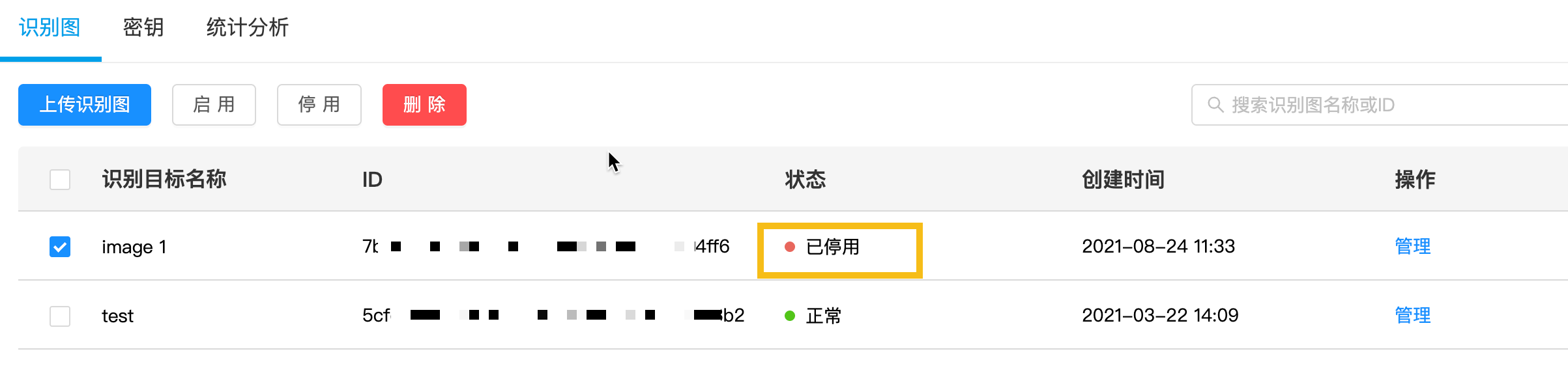
EasyAR provides two ways to handle recognition images that are no longer needed: permanent deletion and temporary deactivation. To ensure stability in production environments, it is recommended that you read the following instructions carefully.
In most business scenarios, if you are not sure whether an image may be used again in the future, it is recommended to use deactivation instead of deletion.
Recognition images can be automatically cleaned up through REST API.
Replace the placeholders with actual parameters and run the curl script.
- Your-Server-side-URL -> actual API host
- Your-Token -> actual API Key Authorization Token
- Your-CRS-AppId -> your appId
- Your-todo-TargetId -> the targetId of the target to delete
curl -X DELETE "https://<Your Server-side-URL>/target/<Your-todo-TargetId>?appId=<Your-CRS-AppId>" \
  -H "Content-Type: application/json" \
  -H "Authorization: <Your-Token>"
Download Java sample code
Import the project through Maven
Step 1. Open the related code file RemoveTarget.java
Step 2. Modify the global variables and replace them with the authentication parameters in your preparation checklist
- CRS AppId
- API Key / API Secret
- TARGET_MGMT_URL -> Server-end URL
- TARGET_ID -> targetId of the target to be deleted
public class RemoveTarget {

    private static final String TARGET_MGMT_URL = "https://cn1.crs.easyar.com";
    private static final String CRS_APPID       = "--here is your CRS AppId--";
    private static final String API_KEY         = "--here is your API Key--";
    private static final String API_SECRET      = "--here is your API Secret--";
    private static final String TARGET_ID       = "my_targetid";
    /* TO_DEL_IDs lists all the targetIds to be removed
     * must be separated by ","
     */
    private static final String TO_DEL_IDs = "targetId1,targetId2,targetId3";

    public String remove(Auth auth, String targetId) throws IOException {
        okhttp3.Request request = new okhttp3.Request.Builder()
                .url(auth.getCloudURL()+"/target/"+targetId+"?"+ Common.toParam(
                        Auth.signParam(new JSONObject(), auth.getAppId(), auth.getApiKey(), auth.getApiSecret())
                ))
                .delete()
                .build();
        return new OkHttpClient.Builder().build().newCall(request).execute().body().string();
    }

    public String removeMultiTargets(Auth auth, String targetIds) throws IOException {
        JSONObject params = new JSONObject().put("targetId", targetIds);
        Auth.signParam(params, auth.getAppId(), auth.getApiKey(), auth.getApiSecret());
        RequestBody requestBody = FormBody.create(MediaType.parse("application/json; charset=utf-8")
                , params.toString());
        okhttp3.Request request = new okhttp3.Request.Builder()
                .url(auth.getCloudURL() + "/targets")
                .delete(requestBody)
                .build();
        return new OkHttpClient.Builder().build().newCall(request).execute().body().string();
    }
    public static void main(String[] args) throws IOException{
        Auth accessInfo  =  new Auth(CRS_APPID, API_KEY, API_SECRET, TARGET_MGMT_URL);
        System.out.println(new RemoveTarget().remove(accessInfo, TARGET_ID));
        System.out.println(new RemoveTarget().removeMultiTargets(accessInfo, TO_DEL_IDs));
    }
}
Step 3. Run Main
Download the NodeJS sample code
Step 1. Configure the key file keys.json
- CRS AppId
- API Key / API Secret
- to-delete-targetId
{
  "appId": "--here is your appId for CRS App Instance for SDK 4--",
  "apiKey": "--here is your api key which is create from website and which has crs permission--",
  "apiSecret": "--here is your api secret which is create from website--"
}
Step 2. Run and specify the key file and Server-end URL
node bin/deleteTarget <to-delete-targetId> -t <Server-end-URL> -c keys.json
var argv = require('yargs')
    .usage('Usage: $0 [targetId] -t [host] -c [keys]')
    .demand(1)
    .default('t', 'http://localhost:8888').alias('t', 'host')
    .default('c', 'keys.json').alias('c', 'keys')
    .help('h').alias('h', 'help')
    .epilog('copyright 2015, sightp.com')
    .argv;

var fs = require('fs');

var targetId = argv._[0];
var host = argv.host;
var keys = JSON.parse(fs.readFileSync(argv.keys));

var farmer = require('../farmer')(host, keys.appKey, keys.appSecret);

farmer.deleteTarget(targetId)
.then(function(resp) {
    console.log(resp.result.targetId);
})
.fail(function(err) {
    console.log(err);
});
deleteTarget calls the cloud service API. The sample code is in farmer.js.
function deleteTarget(targetId) {
    return Q.promise(function(resolve, reject) {
        request.del(host + '/target/' + targetId)
        .query(signParams())
        .end(done(resolve, reject));
    });
}
Download the PHP sample code.
Step 1. Open the entry code demo.php.
Step 2. Modify the global variables and replace them with the authentication parameters in your prepared list.
- CRS AppId
- API Key / API Secret
- Server-end URL
- toDeleteTargetId
<?php
include 'EasyARClientSdkCRS.php';
$apiKey = 'API Key';
$apiSecret = 'API Secret';
$crsAppId = 'CRS AppId'
$crsCloudUrl = 'https://cn1-crs.easyar.com';
$toDeleteTargetId = 'to-delete-targetId';

$sdk = new EasyARClientSdkCRS($apiKey, $apiSecret, $crsAppId, $crsCloudUrl);

$rs = $sdk->delete($toDeleteTargetId);
if ($rs->statusCode == 0) {
  print_r($rs->result);
} else {
  print_r($rs);
}
Step 3. Run php demo.php.
Create the related code file delete_target.py, modify the global variables, and then run
pip install requests
python delete_target.py
import time
import hashlib
import requests

# --- 全局变量配置 ---
API_KEY = "YOUR_API_KEY"
API_SECRET = "YOUR_API_SECRET"
APP_ID = "YOUR_APP_ID"
HOST = "https://crs-cn1.easyar.com"
TARGET_ID = "TARGET_ID"

def main():
    timestamp = str(int(time.time() * 1000))

    params = {
        'apiKey': API_KEY,
        'appId': APP_ID,
        'timestamp': timestamp
    }

    sorted_keys = sorted(params.keys())
    sign_str = "".join([f"{k}{params[k]}" for k in sorted_keys]) + API_SECRET
    signature = hashlib.sha256(sign_str.encode('utf-8')).hexdigest()

    url = f"{HOST}/target/{TARGET_ID}"
    final_params = {**params, 'signature': signature}

    print(f"Requesting DELETE {url}...")
    response = requests.delete(url, params=final_params)
    print(f"Response: {response.text}")

if __name__ == "__main__":
    main()
Create the related code file main.go, modify the global variables, and then run
go run main.go
main.go:
package main
import (
"crypto/sha256"
"fmt"
"io"
"net/http"
"sort"
"strconv"
"time"
)
var (
ApiKey = "YOUR_API_KEY"
ApiSecret = "YOUR_API_SECRET"
AppId = "YOUR_APP_ID"
Host = "https://crs-cn1.easyar.com"
TargetId = "TARGET_ID"
)
func main() {
ts := strconv.FormatInt(time.Now().UnixNano()/1e6, 10)
params := map[string]string{
"apiKey": ApiKey,
"appId": AppId,
"timestamp": ts,
}
keys := make([]string, 0, len(params))
for k := range params { keys = append(keys, k) }
sort.Strings(keys)
builder := ""
for _, k := range keys { builder += k + params[k] }
builder += ApiSecret
signature := fmt.Sprintf("%x", sha256.Sum256([]byte(builder)))
url := fmt.Sprintf("%s/target/%s?apiKey=%s&appId=%s×tamp=%s&signature=%s",
Host, TargetId, ApiKey, AppId, ts, signature)
req, _ := http.NewRequest("DELETE", url, nil)
resp, _ := http.DefaultClient.Do(req)
defer resp.Body.Close()
body, _ := io.ReadAll(resp.Body)
fmt.Printf("Response: %s
", string(body))
}
Add reqwest, tokio, sha2, and hex dependencies in Cargo.toml.
Run cargo run.
use sha2::{Sha256, Digest};
use std::collections::BTreeMap;
use std::time::{SystemTime, UNIX_EPOCH};
const API_KEY: &str = "YOUR_API_KEY";
const API_SECRET: &str = "YOUR_API_SECRET";
const APP_ID: &str = "YOUR_APP_ID";
const HOST: &str = "https://crs-cn1.easyar.com";
const TARGET_ID: &str = "YOUR_TARGET_ID";
#[tokio::main]
async fn main() -> Result<(), Box<dyn std::error::Error>> {
let ts = SystemTime::now().duration_since(UNIX_EPOCH)?.as_millis().to_string();
let mut params = BTreeMap::new();
params.insert("apiKey", API_KEY);
params.insert("appId", APP_ID);
params.insert("timestamp", &ts);
let mut sign_str = String::new();
for (k, v) in ¶ms {
sign_str.push_str(k);
sign_str.push_str(v);
}
sign_str.push_str(API_SECRET);
let mut hasher = Sha256::new();
hasher.update(sign_str.as_bytes());
let signature = hex::encode(hasher.finalize());
let url = format!("{}/target/{}?apiKey={}&appId={}×tamp={}&signature={}",
HOST, TARGET_ID, API_KEY, APP_ID, ts, signature);
let res = reqwest::Client::new().delete(url).send().await?;
println!("Response: {}", res.text().await?);
Ok(())
}
Create a .NET console project.
dotnet new console
dotnet run
using System;
using System.Collections.Generic;
using System.Linq;
using System.Security.Cryptography;
using System.Text;
using System.Net.Http;

class Program {
    static string API_KEY = "API_KEY";
    static string API_SECRET = "API_SECRET";
    static string APP_ID = "APP_ID";
    static string HOST = "https://crs-cn1.easyar.com";
    static string TARGET_ID = "TARGET_ID";

    static async System.Threading.Tasks.Task Main() {
        string timestamp = DateTimeOffset.Now.ToUnixTimeMilliseconds().ToString();

        var dict = new SortedDictionary<string, string> {
            { "apiKey", API_KEY },
            { "appId", APP_ID },
            { "timestamp", timestamp }
        };

        StringBuilder sb = new StringBuilder();
        foreach (var kv in dict) sb.Append(kv.Key).Append(kv.Value);
        sb.Append(API_SECRET);

        string signature = Sha256(sb.ToString());

        using var client = new HttpClient();
        string query = string.Join("&", dict.Select(x => $"{x.Key}={x.Value}")) + $"&signature={signature}";
        string url = $"{HOST}/target/{TARGET_ID}?{query}";

        var response = await client.DeleteAsync(url);
        Console.WriteLine($"Result: {await response.Content.ReadAsStringAsync()}");
    }

    static string Sha256(string str) {
        byte[] bytes = SHA256.HashData(Encoding.UTF8.GetBytes(str));
        return BitConverter.ToString(bytes).Replace("-", "").ToLower();
    }
}
- Runtime environment
- Unity 2020 LTS or later
- Scripting Backend: Mono or IL2CPP are both supported
- API Compatibility Level: .NET Standard 2.1 (recommended)
Step 1: Prepare the image file
- Create a directory in the Unity project:
Assets/
└── Scripts/
     └── DeleteImageTarget.cs
using System.Collections;
using UnityEngine;
using UnityEngine.Networking;

public class DeleteImageTarget : MonoBehaviour
{
    [Header("Config")]
    public string targetId = "Your targetId";
    public string apiBaseUrl = "https://Your-Server-end-URL";
    public string authorizationToken = "YOUR API KEY AUTH TOKEN";
    public string crsAppId = "CRS-AppId";

    private void Start()
    {
        StartCoroutine(DeleteTarget());
    }

    private IEnumerator DeleteTarget()
    {

        string url =
            $"{apiBaseUrl}/target/{targetId}?appId={crsAppId}";

        UnityWebRequest request = UnityWebRequest.Delete(url);
        request.downloadHandler = new DownloadHandlerBuffer();

        request.SetRequestHeader("Content-Type", "application/json");
        request.SetRequestHeader("Authorization", authorizationToken);

        yield return request.SendWebRequest();

        if (request.result == UnityWebRequest.Result.Success)
        {
            Debug.Log("Delete target success:");
            Debug.Log(request.downloadHandler.text);
        }
        else
        {
            Debug.LogError("Delete target failed:");
            Debug.LogError(request.error);
            Debug.LogError(request.downloadHandler.text);
        }
    }
}
Step 3: Configure parameters (Inspector)
Modify the following in the Inspector panel:
- Api Url
- Authorization Token
- Crs App Id
- Target Id: targetId of the target image to delete
Only modify these items to run, and fill in the parameters prepared in the preparation checklist
Step 4: Run
- Click Play
- View the result in Console:
- Success: returns JSON (including targetId)
- Failure: HTTP / error information