AR Session component reference
Explore the properties in the AR Session component window to customize session parameters.
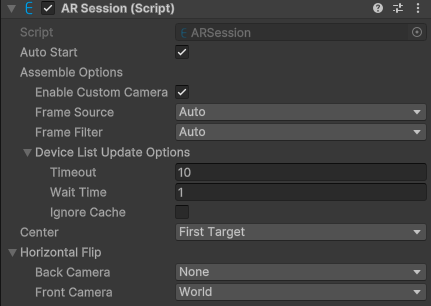
Component screenshot under default conditions.
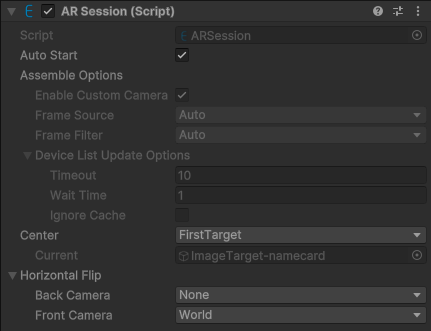
Component screenshot at runtime.
| Property | Description |
|---|---|
| Auto Start | Controls whether the session starts automatically. If the value is true (default), the session starts automatically at MonoBehaviour.Start().See: session flow control |
| Assemble Options | Assembly options for the session. |
| Enable Custom Camera | Enables custom cameras (default true).Custom cameras include AR Engine frame source, AR Foundation frame source, all headsets, and all custom frame sources. When using trial products on a custom camera or headset, such as a Personal license, trial XR license, or trial Mega service, EasyAR Sense stops responding 100 seconds after each startup. For Mega users, this duration can be adjusted after approval through EasyAR business. This limitation does not apply to paid versions of EasyAR Sense or paid EasyAR Mega services. |
| Frame Source | FrameSource selection strategy:
|
| Frame Filter | FrameFilter selection strategy:
|
| Device List Update Options | Device list update options. See: availability and device support |
| Timeout | Request timeout, in seconds. |
| Wait Time | Wait time, in seconds. If the wait time is exceeded, execution continues even if the download has not completed. After the download completes, it is updated through events. |
| Ignore Cache | Ignore cache and force download regardless of whether the current process downloaded it recently. |
| Center | AR center mode:
See: center mode |
| Target | Manually specified center object. When running in the editor, it updates with the session state and changes take effect immediately. |
| Current | Indicates the center object currently used by the session at runtime. |
| Horizontal Flip | Horizontal mirrored rendering mode. Available only when using image or object tracking. When running in the editor, it updates with the session state and changes take effect immediately. |
| Back Camera | Horizontal mirrored rendering mode for the rear camera:
|
| Front Camera | Horizontal mirrored rendering mode for the front camera:
|