Create XR Origin
The following content explains how to create and configure XR Origin and XR Origin Child in a Unity scene.
Before You Begin
- Learn the basic concepts, composition, and workflow of session through ARSession Overview.
- Learn the basic concepts, composition, and lifecycle of XR Origin through XR Origin.
Create XR Origin (EasyAR)
In the Hierarchy view, right-click a blank area, and use the menu EasyAR Sense > Origin > Origin : XR Origin (EasyAR) to create a complete origin structure.
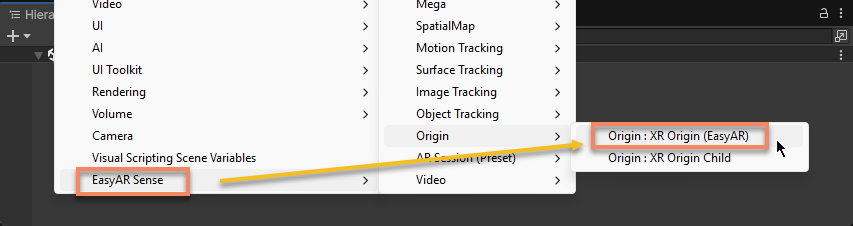
In scripts, you can create it with ARSessionFactory.CreateOrigin():
ARSessionFactory.CreateOrigin();
Note
When session is running, if there is no correct XR Origin structure in the scene, XR Origin and an XR Origin Child will be created automatically.
[Optional] Create XR Origin (Unity XR)
In the Hierarchy view, right-click a blank area, and use the menu XR > XR Origin (Mobile AR) to create an XR Origin suitable for AR Foundation. For details about this XR Origin and how to create it, refer to the Unity official documentation: Add Unity XR's XR Origin to a scene.
Note
When using headsets, be sure to follow the documentation of the corresponding headset SDK.
When using the XR Origin provided by the Unity XR framework, you need to manually add an XR Origin Child.
Add XR Origin Child to XR Origin
In the Hierarchy view, select XR Origin (EasyAR) or XR Origin and right-click it, then use the menu EasyAR Sense > Origin > Origin : XR Origin Child to add an XR Origin Child under XR Origin.
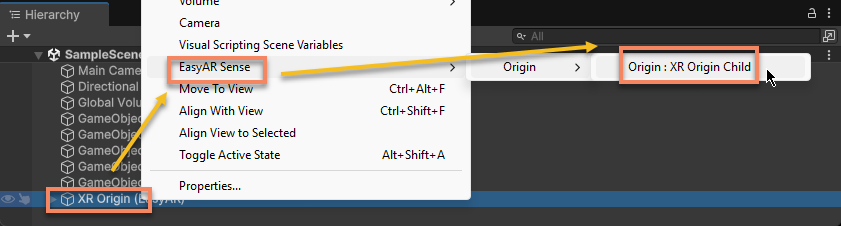
In scripts, you can use ARSessionFactory.AddOriginChild(GameObject):
ARSessionFactory.AddOriginChild(origin);
You can add any number of XR Origin Child objects, and they will all work normally. However, for objects generated internally by session, only the first XR Origin Child will be used as the parent node.
Note
When session is running, if there is no correct XR Origin Child structure in the scene, XR Origin Child will be created automatically.
Next Steps
- Learn about the active control strategy of XR Origin