Unity AR motion tracking center —— XR Origin
XR Origin is the core concept of motion tracking functionality in Unity. In modern AR applications, motion tracking is gradually becoming an essential feature. Through motion tracking, applications can understand the user's position and orientation in the real world without relying on other markers, enabling immersive AR experiences. The following content will help you understand the basic concepts, composition, lifecycle of XR Origin, and when to use it.
Before you begin
- Understand the basic concepts, composition, and workflow of sessions through ARSession Introduction.
What is XR Origin
When motion tracking initializes, it selects a reference point as the tracking origin. This reference point is typically the device's position when the user starts the application or when the system AR service initializes. The representation of this reference point in the Unity scene is XR Origin. In most cases, the starting position of XR Origin in the scene is also the default starting position of the camera.
This video demonstrates a simple AR scene with only motion tracking running. The left side shows the
Hierarchyview, the middle shows theSceneview, and the right shows theGameview. The video was recorded in Unity Editor'sPlaymode using simulated runtime data. The content of theGameview is identical to what users see in the real world through their mobile devices.As shown, XR Origin (blue sphere) remains fixed in the scene, while the camera representing the user (camera icon) moves according to the user's real-world movements. The white cones trace the camera's position and orientation over time, illustrating its movement in the scene. These white cones are generated under the XR Origin node, representing a typical organizational structure for objects in such scenes.
In Unity's motion tracking system, the camera generally follows XR Origin. Although the camera isn't necessarily a child node of XR Origin, the AR Session calculates the camera's position based on XR Origin's position to ensure consistency between what users see and the real world.
This video shows the same scene, but this time we moved XR Origin (blue sphere) during runtime. After moving XR Origin, the camera follows its movement, while the
Gameview content remains unchanged.
In actual AR scenes, this motion relationship is more complex.
XR Origin behavior in different center modes
In Unity, all AR tracking reference points are called session centers, and the rules determining this center during session operation are called center modes. XR Origin behaves differently in various center modes:
- In SessionOrigin center mode, XR Origin can be moved freely. Typically, SessionOrigin mode is used in scenes where only motion tracking is active. When other features run simultaneously, SessionOrigin mode is usually not used. However, when using headsets, if manufacturers haven't properly implemented motion tracking reference points in Unity, you must use Unity's world center, forcing SessionOrigin mode. This requires the content root node to follow AR functionality, which may affect content quality, but there's no alternative until third-party manufacturers make changes.
- In other center modes (e.g., FirstTarget), XR Origin cannot be moved freely. Typically, FirstTarget mode is used in non-motion-tracking scenes or when other AR features run alongside motion tracking. In this mode, XR Origin's position is determined by AR features, so it cannot be moved arbitrarily. For detailed information about center modes and object movement within scenes, refer to: Center Mode.
Form and composition of XR Origin
EasyAR supports two different forms of XR Origin:
- XR Origin provided by EasyAR
- XR Origin provided by Unity XR framework
XR Origin (EasyAR)
A typical XR Origin structure is as follows:
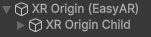
The XR Origin root node is an empty GameObject, which can have one or more XR Origin Child nodes. XR Origin Child contains a XROriginChildController component that proxies XR Origin control logic.
During session runtime, if no correct XR Origin structure exists in the scene, XR Origin and an XR Origin Child are automatically created. During operation, XR Origin Child is constrained to the same position and orientation as XR Origin.
Objects generated by the session, such as sparse spatial mapping point clouds or dense spatial mapping meshes, are created under XR Origin Child nodes.
This video demonstrates dense spatial mapping running alongside motion tracking in the same scene. The generated mesh is created under the XR Origin Child node.
Note: Depth map generation was disabled for clarity, so the
Sceneview content differs from actual runtime display. TheGameview display effect matches when mesh transparency is disabled.
[Optional] XR Origin (Unity XR)
If needed, you can choose to use the XR Origin component provided by the Unity XR framework.
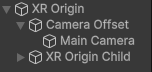
When using Unity XR framework's XR Origin, a typical structure is as follows:
In headset scenarios, a typical structure is:
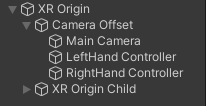
The XR Origin root node is a GameObject created and maintained by the Unity XR framework, which can have one or more XR Origin Child nodes. XR Origin Child contains a XROriginChildController component that proxies XR Origin control logic.
During session runtime, if no correct XR Origin Child structure exists in the scene, XR Origin Child is automatically created. During operation, XR Origin Child is constrained to the same position and orientation as XR Origin.
The XR Origin provided by Unity XR framework primarily supports two scenarios:
- You're already using AR Foundation in your project and want it to work alongside EasyAR or switch between them based on device support.
- The headset SDK you're using utilizes the XR Origin component provided by Unity XR framework.
Note
When Unity XR's core package com.unity.xr.core-utils isn't imported into the project, if the scene camera is in the same hierarchy as Unity XR framework's XR Origin (Camera and its parent node named Camera Offset), the session assumes this structure was created by Unity XR framework and uses it. This maximizes scene compatibility: scenes created with AR Foundation will still function normally (excluding AR Foundation-specific features) even when AR Foundation isn't imported. This doesn't affect overall AR functionality or device compatibility beyond features exclusive to AR Foundation.
Most EasyAR sample scenes use this approach to ensure they run without AR Foundation while demonstrating interoperability when AR Foundation is present.
In AR Foundation's definition, its XR Origin is the center of tracked space in XR scenes. However, note that in AR Foundation's concept, motion tracking is mandatory, and its description of tracking in XR scenes refers to motion tracking.
In EasyAR's system, motion tracking is optional, making XR Origin optional too. XR Origin is only created and used when motion tracking is enabled.
Lifecycle of XR Origin
XR Origin's lifecycle depends on the session. When a session starts, XR Origin is selected or created (if no correct structure exists in the scene). When a session stops, XR Origin remains until used by the next session or manually deleted.
Next steps
Creation
Try Creating XR Origin in your scene Runtime control
Understand XR Origin's Active Control Strategy