Configure GoPro Max for Spatial Data Collection
This article describes how to correctly configure the GoPro Max panoramic camera, including key steps such as hardware preparation, camera parameter settings, physical installation requirements, and environment checks, to ensure high-quality data is collected for EasyAR Mega spatial map construction.
Note
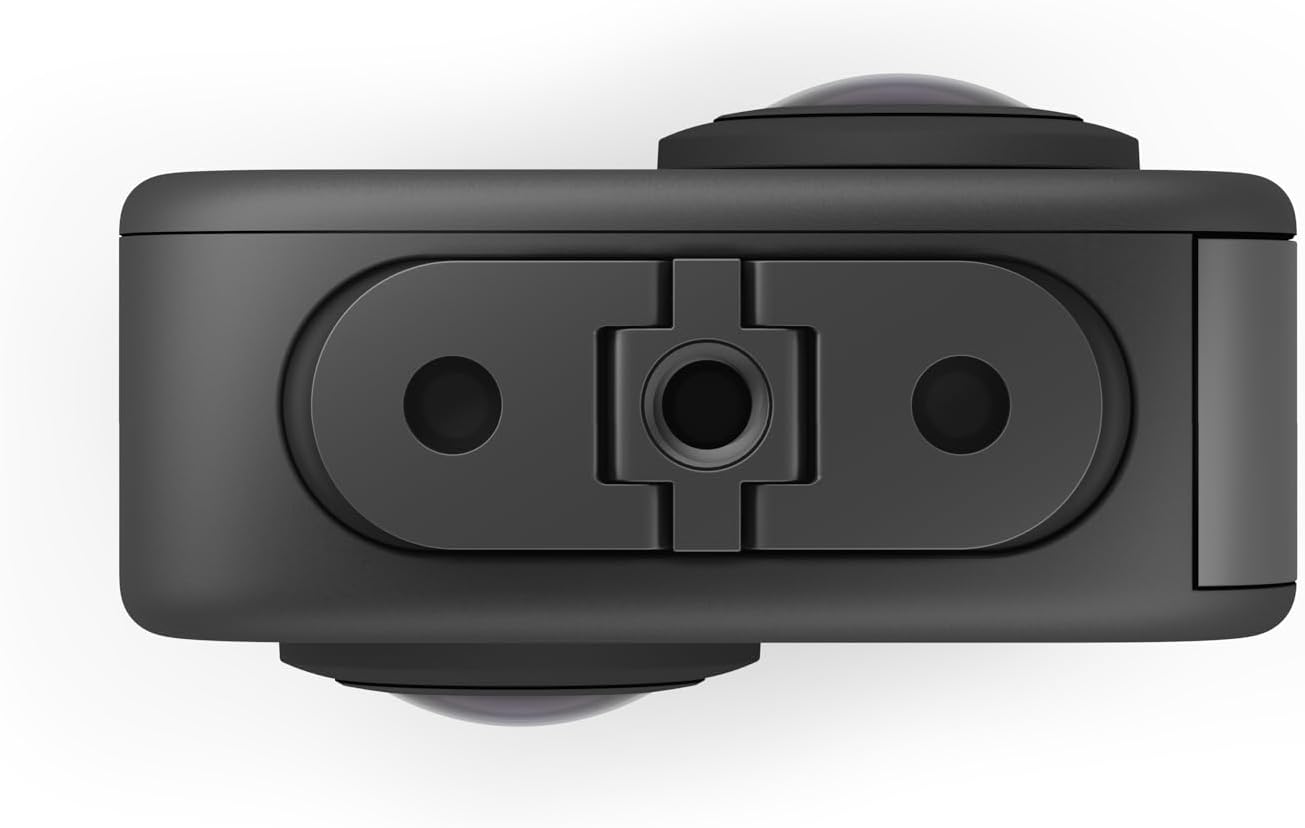
The two lenses on the GoPro Max body are not on the same axis (as shown in the bottom view below). Please note the distinction from the GoPro Max2 (the two lenses are coaxial). If your device is a GoPro Max2, please refer to the GoPro Max2 Configuration Guide for configuration.
Hardware Preparation
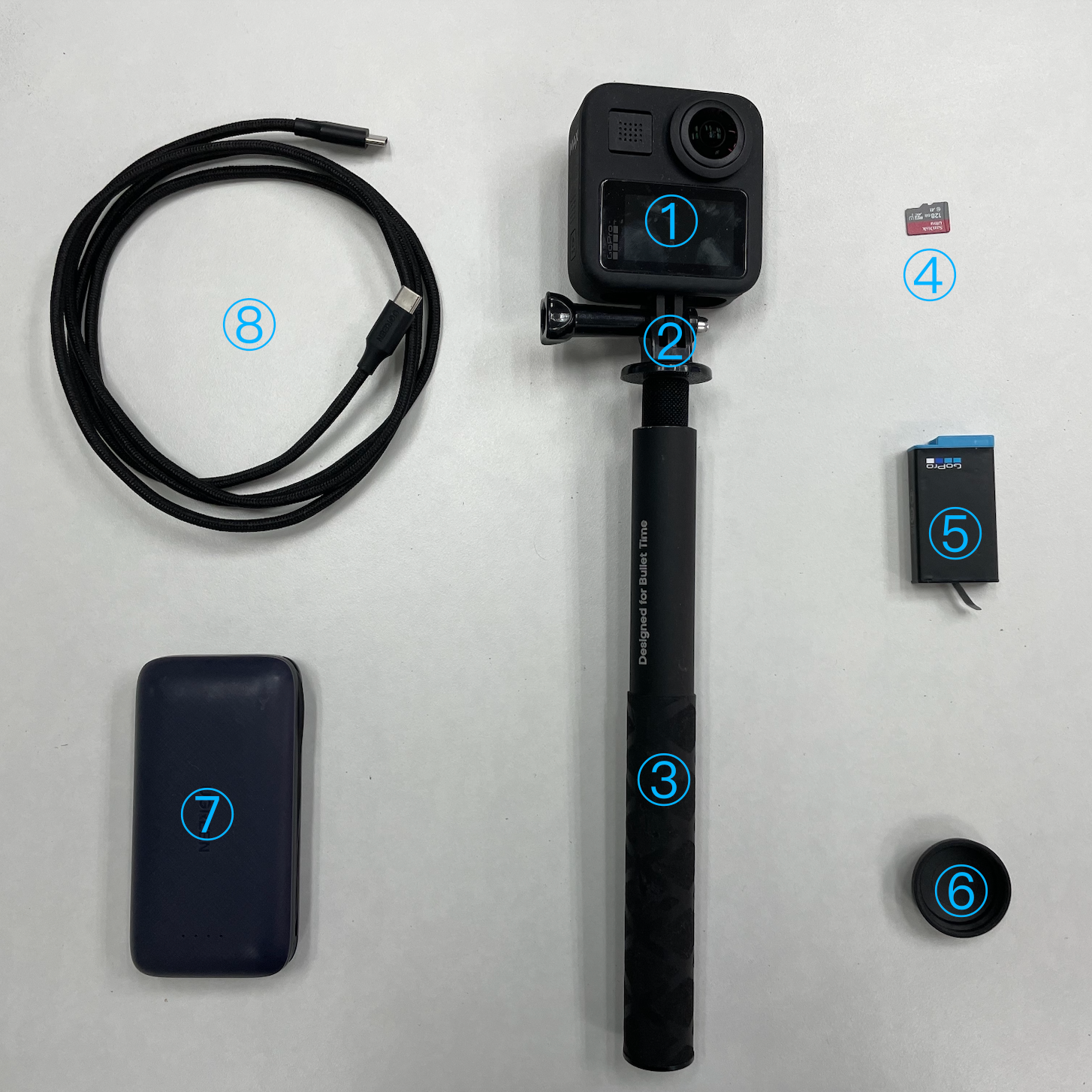
- GoPro Max 360-degree panoramic action camera
- GoPro camera adapter
- Selfie stick, 120cm (it is recommended to use the official selfie stick of GoPro Max)
Ensure that the collector's body blocks the least amount of the frame. 4. SanDisk SD card for action cameras, 256G (please purchase SanDisk Extreme or other brand's cards of the same level)
- You must use a memory card with a V30/A2 level or above or a UHS-3 speed level or above.
- It is recommended to have a capacity of 256G.
Reason: The write volume of 5.6K panoramic videos is extremely large. A low-speed card will cause recording interruptions or frame drops, making the data unusable. 5. Original battery of GoPro Max (one battery comes with the panoramic camera)
- Panoramic recording consumes power quickly. It is recommended to prepare at least 1 - 2 batteries or use a high-capacity power bank for direct power supply.
- Note: Do not change the battery during a single collection process. Bringing extra batteries is for multiple collections.
- Summer tip: When collecting outdoors in summer, remove the battery and only use the power bank (using the battery in summer will cause the GoPro Max to overheat and shut down).
- GoPro Max lens cap
- Power bank
- Double-ended Type-C fast charging cable
GoPro Max Camera Settings
The GoPro Max panoramic camera comes with a built-in screen. Set the device through touch operations. Turn on the camera, swipe down on the touchscreen to enter the control panel, and ensure it is in 360 Video Mode (panoramic video mode).
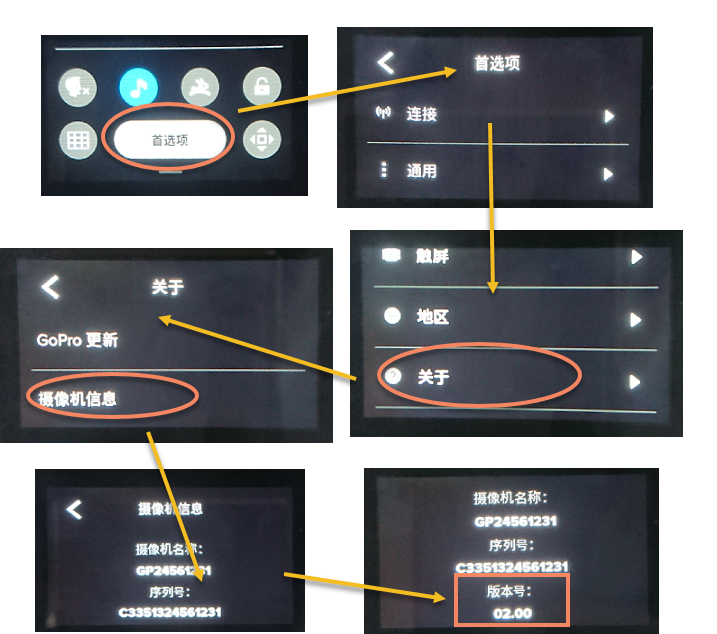
Check the System Firmware Version
If your camera is the first generation of GoPro Max, ensure that the firmware version is 2.0.
GNSS Positioning Settings
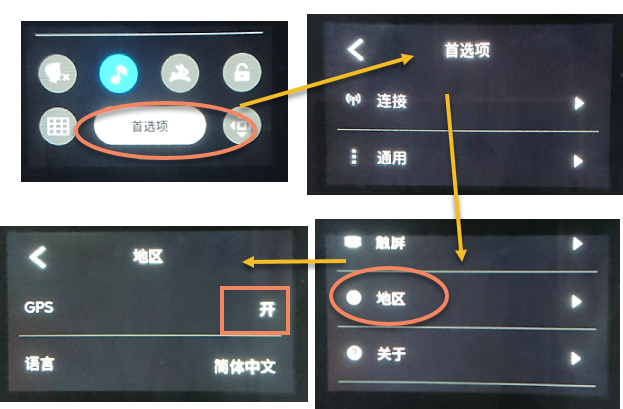
The Mega service relies on GNSS (GPS, Beidou, etc.) data to determine the geographic coordinate system of the spatial map. Ensure that the GPS status is ON (enabled).
Read Before Collection: Confirm GNSS Lock
Before clicking the recording button, please wait stationary in an open outdoor area for 1 - 2 minutes. Observe that the GPS icon on the screen becomes bright/solid (indicating that the satellite is locked).
Note
The Mega positioning service can still work normally if you collect data indoors or in the basement (where there is no GNSS signal).
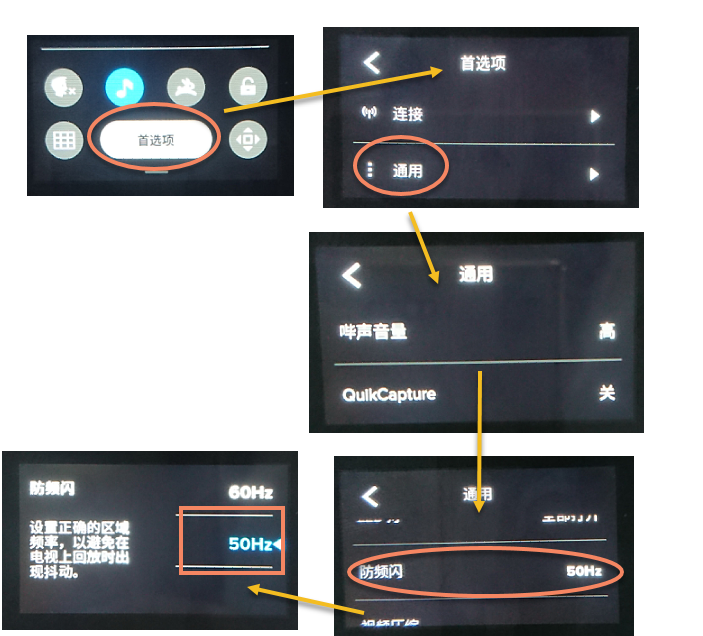
Set Anti-Flicker
The anti-flicker setting needs to be determined according to the alternating current in the area where you are shooting.
In mainland China, set it to 50Hz. For overseas countries or regions, if the alternating current frequency of the local power grid is 60Hz, set it to 60Hz accordingly.
Note
If you are unsure of the alternating current frequency in your country or region, you can check on the corresponding page. Note that the alternating current frequency may vary by region in some countries.
Set the Video Format
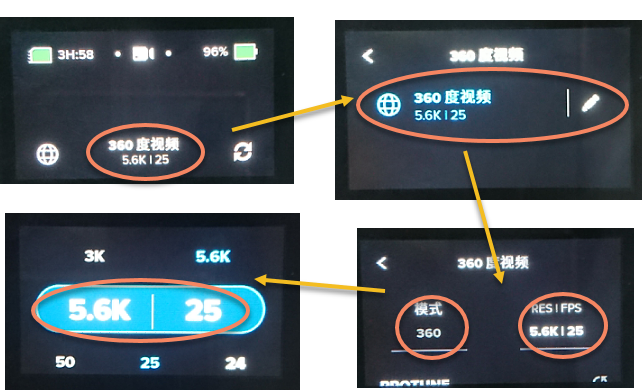
Check and set the video format to 360-degree video, and select the resolution of 5.6K.
The frame rate of the video needs to be set accordingly based on the anti-flicker setting in the previous step.
In mainland China, with the anti-flicker set to 50Hz, select a shooting frame rate of 25fps. For overseas countries or regions, if the alternating current frequency of the local power grid is 60Hz, select a shooting frame rate of 30fps.
Note
You can only see the required shooting frame rate after correctly setting the anti-flicker.
Physical Installation and Environment Check
Check and Wipe the Lenses
- Check that the lenses have no wear. Blurry images due to lens wear will directly affect map construction.
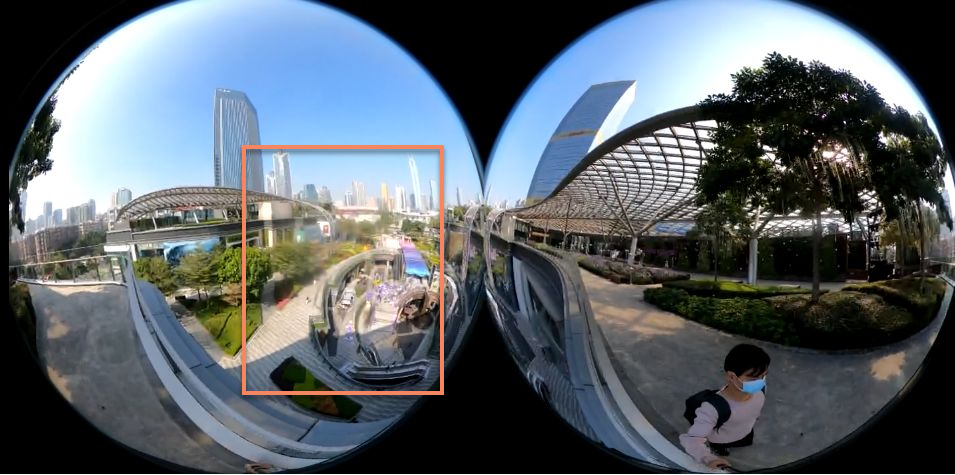
- Wipe the device lenses before collection. Do not wipe the lenses during the collection process.
Note
The lenses of the panoramic camera are very prominent and are prone to getting fingerprints. Oil on the lenses will form glare (Flare) in strong light, directly destroying image features and causing "ghosting" or positioning drift in map construction. 3. Remember to remove the lens protection cover before collection.
Camera Installation and Holding Method
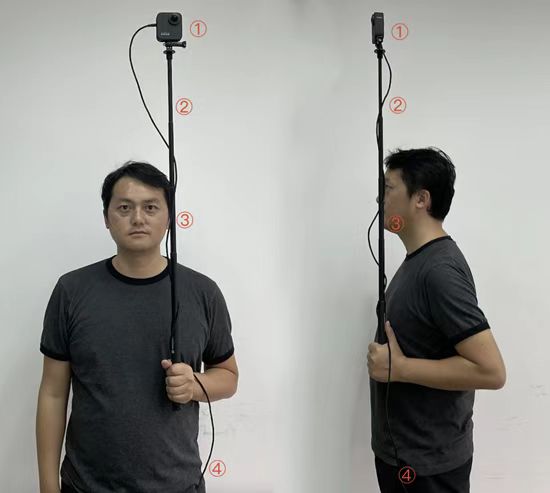
- Camera direction: The side of the camera without the screen faces forward, the side with the screen faces yourself, and all lens caps are removed.
- Selfie stick adjustment: Extend the selfie stick about 4 sections, so that it is about one head higher than your head.
- Holding posture:
- Keep the stick vertical throughout the process and close to your ear to ensure that the camera is directly above your head as much as possible. Do not rest it on your shoulder.
- Hold the selfie stick with both hands. During the collection process, hold the device steadily while moving to keep the camera stable and prevent the lenses from being blocked by foreign objects.
- Do not play with your phone while walking.
- Try not to rotate in place or make sudden large movements during the collection process.
- If the panoramic camera is bumped or dropped during the collection process, you need to re-fix it and start the collection from the beginning.
- Device connection: Put the power bank connected to the GoPro via a data cable in your pocket.
Installation Height
- Install the camera on the top of the selfie stick.
- Raise the selfie stick so that the camera height is maintained between 1.5 meters and 1.8 meters (the height of the camera on the phone or XR glasses when the end user uses them).
- Keep the selfie stick vertical and minimize the proportion of the collector's body in the frame.
Height Requirements for Different Environments
| Environment Type | Recommended Height Range |
|---|---|
| Outdoor environment | 1.6 meters ~ 1.9 meters |
| Indoor open environment | 1.6 meters ~ 1.8 meters |
| Indoor enclosed low-ceiling environment | 1.55 meters ~ 1.65 meters |
Important
Outdoor collection: When collecting outdoors, raise the camera slightly above your head, about 20cm. Otherwise, the photographer will occupy a large area in the frame, affecting the final map construction effect.
Indoor enclosed low-ceiling environment collection: When collecting in places such as offices, corridors, and exhibition halls, appropriately lower the height of the selfie stick to ensure that the height of the GoPro does not exceed 1.65 meters, so as to avoid the photographer's body occupying too large a proportion in the frame and affecting the map construction effect. The higher the installation height of the GoPro during collection, the worse the positioning effect will be.
Next Steps
After the device configuration is completed, please continue to read the collection-related precautions: