Use a panoramic camera to acquire ultra-large-scale spatial data
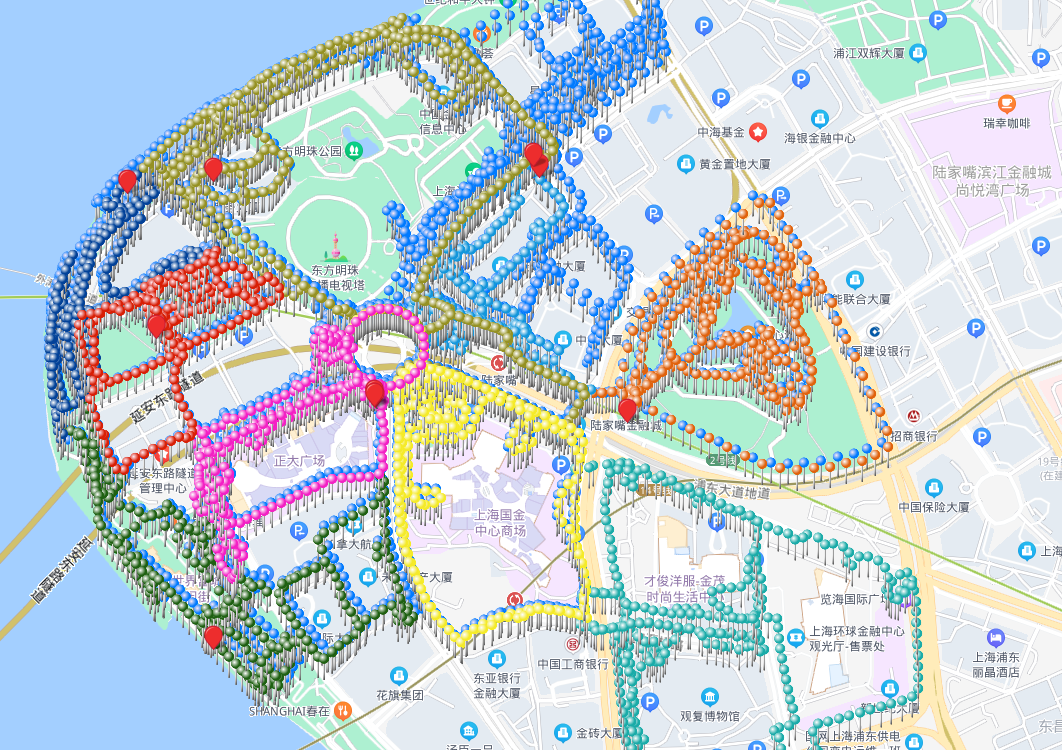
For ultra-large scenes such as tourist attractions, city blocks, and large commercial complexes with areas exceeding hundreds of thousands of square meters or even millions of square meters, a single acquisition and single large-map mode cannot meet the requirements. For this reason, Mega provides city-scale ultra-large spatial multi-map fusion. With this feature, you can break through the original spatial usage limits and implement city-scale VPS localization.
If the entire continuous space cannot be acquired within 2 hours, it is recommended to use the multi-map fusion feature.
Note
This feature requires developers to apply to business. We will unlock fusion mapping permission according to project requirements.
By default, Mega only supports fusion mapping of 5 subareas. If you need to fuse a larger map range, you also need to apply to business.
Solution
The standard solution for ultra-large spaces is to divide the whole into parts. Logically split the entire large scene into multiple physically overlapping subareas, acquire each subarea separately, and finally fuse and optimize all subareas. This enables seamless roaming at runtime through dynamic loading.
Acquisition planning
- Divide the large scene by area, scene, or functional region. The area of each region should be within
100,000 square meters. - Adjacent subareas need at least
200 metersof fully overlapping paths. The larger the overlap, the better the fused map. Ensure there is enough overlap to fuse and optimize adjacent submaps. - Select areas with rich texture. Do not choose scenes such as large white walls, glass, or woods.
- Ensure that the acquisition route on the overlapping path is exactly the same, including travel direction and the specific route. Simply put, walk along the previous acquisition route without any deviation.
- Try to complete acquisition of adjacent subareas during similar time periods. Avoid acquiring one at noon and another at dusk, because lighting differences may cause fusion failure.
- For multi-floor indoor and outdoor scenes, it is recommended to divide "outdoor + indoor first floor" into one acquisition unit and "overall indoor floors" into another acquisition unit. The two establish a spatial connection through the common area on the indoor first floor and are finally fused into a unified ultra-large scene map.
Acquisition requirements
Use a GoPro Max/Max2 panoramic camera for ultra-large space acquisition to ensure data quality and stitching efficiency.
- Each subarea's data needs its own planned acquisition route
- Configure GoPro Max or GoPro Max2
- Follow single-map acquisition requirements during acquisition
- Use the checklist to check whether the acquisition requirements are met before and during acquisition
Next steps
- If this is your first time using Mega mapping, first create a mapping project
- In Mega Developer Center, create an ultra-large-range multi-map fusion task, upload multiple segmented acquisition videos, and the cloud mapping algorithm will automatically stitch and optimize them.