Before officially adding an image to the cloud recognition (CRS) image library, the best practice is to evaluate its quality in advance.
If the recognizable area of the target image is too small, such as a white wall or solid color block, or if the texture is too simple, its recognition success rate will be greatly reduced. This chapter describes the CRS rating mechanism in detail to help you select high-quality AR recognition materials.
We mainly focus on the following two comprehensive metrics. Each has a separate API endpoint that provides a comprehensive rating:
These metrics rate the image from the perspective of image algorithms, and each metric is still given from 0 to 4 according to difficulty.
Each target image in the database has detailed rating information in its details. You can obtain target image properties through the API to view them. You can also view them through EasyAR cloud recognition management.
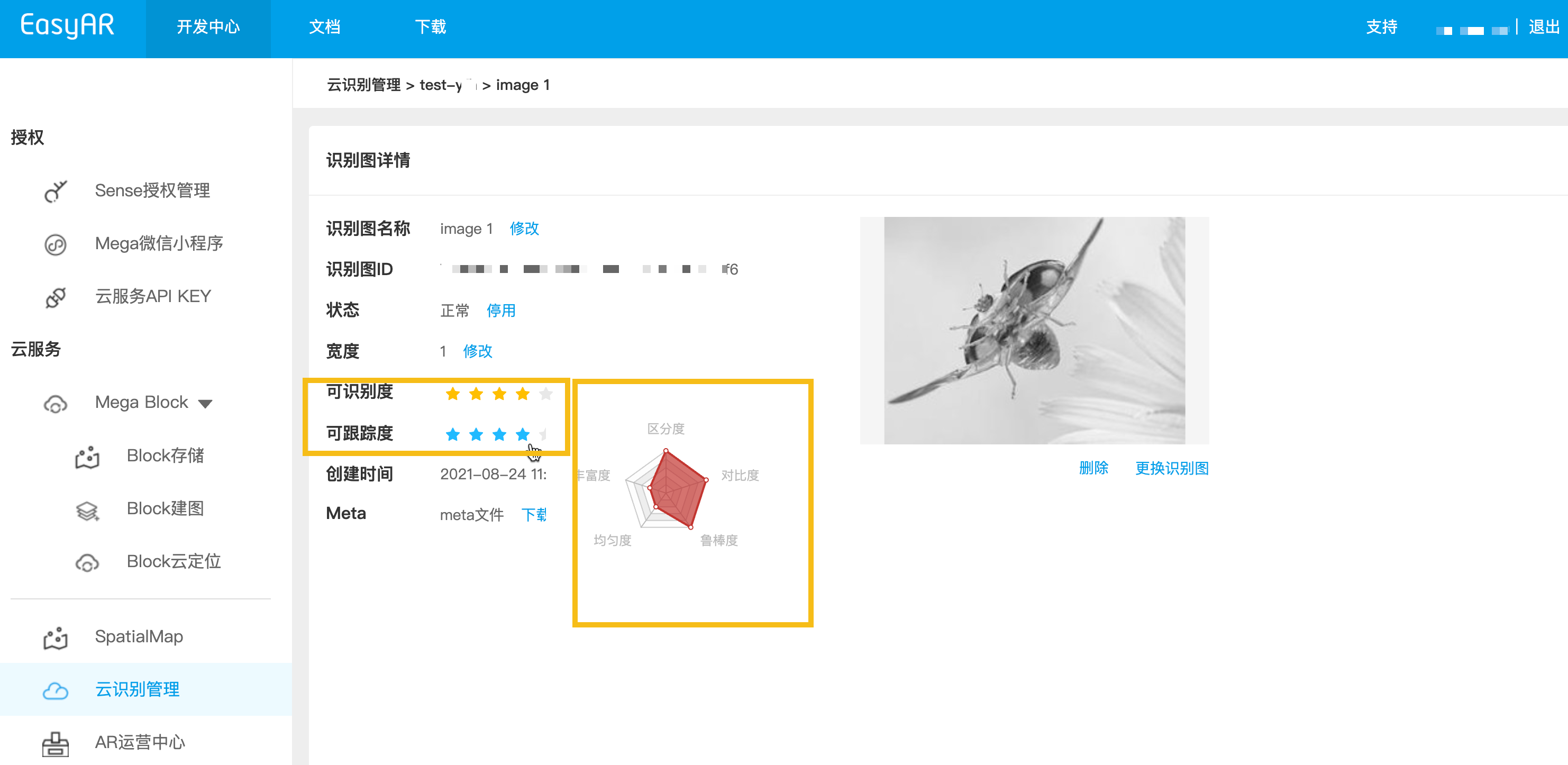
As shown in the figure, the details page contains two core comprehensive metrics, and a pentagon displays five detailed metrics.
When building an automated upload backend, we recommend calling the rating endpoint before the official upload.
- First convert the local target image to Base64 (macOS / Linux), and save the result to image_base64.txt.
base64 -i ./target.jpg | tr -d '\n' > image_base64.txt
- Replace the placeholders with actual parameters and run the curl script.
- Your-Server-side-URL -> actual API host
- Your-Token -> actual API Key Authorization Token
- Your-CRS-AppId -> your appId
curl -X POST "https://<Your-Server-side-URL>/grade/detail" \
  -H "Content-Type: application/json" \
  -H "Authorization: <YOUR-TOKEN>" \
  -d '{
    "appId": "<Your-CRS-AppId>",
    "image": "'"$(cat image_base64.txt)"'"
  }'
Download the Java sample code
Import the project through Maven
Step 1. Open the related code file Grade.java
Step 2. Modify the global variables and replace them with the authentication parameters in your preparation checklist
- CRS AppId
- API Key / API Secret
- Server-end URL
- IMAGE_PATH: target image file to be uploaded
import okhttp3.*;
import org.json.JSONObject;
import java.io.IOException;
import java.nio.file.Files;
import java.nio.file.Path;
import java.nio.file.Paths;
import java.util.Base64;
import java.util.HashMap;
import java.util.Map;

public class Grade {
    private static final String TARGET_MGMT_URL = "http://cn1.crs.easyar.com:8888";
    private static final String CRS_APPID       = "--here is your CRS AppId--";
    private static final String API_KEY         = "--here is your API Key--";
    private static final String API_SECRET      = "--here is your API Secret--";
    private static final String IMAGE_PATH      = "test_target_image.jpg";

    enum GradeType {
        DETAIL,
        DETECTION,
        TRACKING
    }
    private static final Map<GradeType, String> GRADE_URL = new HashMap<GradeType, String>(){
        {
            put(GradeType.DETAIL,    "/grade/detail") ;
            put(GradeType.DETECTION, "/grade/detection") ;
            put(GradeType.TRACKING, "/grade/tracking") ;
        }
    };

    public String grade(Auth auth, String imgPath, GradeType gradeType) throws IOException {
        final Path mImagePath   = Paths.get(imgPath);
        JSONObject params = new JSONObject().put("image", Base64.getEncoder().encodeToString(
                Files.readAllBytes(mImagePath)
        ));
        Auth.signParam(params, auth.getAppId(), auth.getApiKey(), auth.getApiSecret());
        RequestBody requestBody = FormBody.create(MediaType.parse("application/json; charset=utf-8")
                , params.toString());
        Request request = new Request.Builder()
                .url(auth.getCloudURL() + GRADE_URL.get(gradeType))
                .post(requestBody)
                .build();
        return new OkHttpClient.Builder().build().newCall(request).execute().body().string();
    }

    public static void main(String[] args) throws IOException {
        Auth accessInfo  =  new Auth(CRS_APPID, API_KEY, API_SECRET, TARGET_MGMT_URL);

        System.out.println("================== grade details ==================");
        System.out.println(new Grade().grade(accessInfo, IMAGE_PATH, GradeType.DETAIL));

        System.out.println("================== grade for detection ==================");
        JSONObject gradeResp = new JSONObject(new Grade().grade(accessInfo, IMAGE_PATH, GradeType.DETECTION));
        System.out.println("Detection grade: " + gradeResp.getJSONObject(Common.KEY_RESULT).get(Common.KEY_GRADE));

        System.out.println("================== grade for tracking =================== ");
        gradeResp = new JSONObject(new Grade().grade(accessInfo, IMAGE_PATH, GradeType.TRACKING));
        System.out.println("Tracking grade: " + gradeResp.getJSONObject(Common.KEY_RESULT).get(Common.KEY_GRADE));
    }
}
Step 3. Run Main
Download the NodeJS sample code
Step 1. Configure the key file keys.json
- CRS AppId
- API Key / API Secret
{
  "appId": "--here is your appId for CRS App Instance for SDK 4--",
  "apiKey": "--here is your api key which is create from website and which has crs permission--",
  "apiSecret": "--here is your api secret which is create from website--"
}
Step 2. Run, specifying the test image, key file, and Server-end URL
node bin/grade test.jpeg -t <Server-end-URL> -c keys.json
var argv = require('yargs')
    .usage('Usage: $0 [image] -t [host] -c [keys]')
    .demand(1)
    .default('t', 'http://localhost:8888').alias('t', 'host')
    .default('c', 'keys.json').alias('c', 'keys')
    .help('h').alias('h', 'help')
    .epilog('copyright 2015, sightp.com')
    .argv;

var fs = require('fs');

var imageFn = argv._[0];
var host = argv.host;
var keys = JSON.parse(fs.readFileSync(argv.keys));

var farmer = require('../farmer')(host, keys);

farmer.getTrackingGrade({
    'image': fs.readFileSync(imageFn).toString('base64')
})
.then(function(resp) {
    console.log(resp);
})
.fail(function(err) {
    console.log(err);
});
Download the PHP sample code
Step 1. Open the entry code demo.php
Step 2. Modify the global variables and replace them with the authentication parameters in your prepared list
- CRS AppId
- API Key / API Secret
- Server-end URL
- imageFilePath : path of the target image file to upload
<?php
include 'EasyARClientSdkCRS.php';
$apiKey = 'API Key';
$apiSecret = 'API Secret';
$crsAppId = 'CRS AppId'
$crsCloudUrl = 'https://cn1-crs.easyar.com';
$imageFilePath = '1.jpg'

$sdk = new EasyARClientSdkCRS($apiKey, $apiSecret, $crsAppId, $crsCloudUrl);

$image = base64_encode(file_get_contents($imageFilePath));
$rs = $sdk->detection($image);
if ($rs->statusCode == 0) {
  print_r($rs->result->grade);
} else {
  print_r($rs);
}
Step 3. Run php demo.php
Create the related code file grade.py, modify the global variables, and then run
pip install requests
python grade.py
import time
import hashlib
import requests
import base64

# --- Global Configuration ---
API_KEY = "YOUR_API_KEY"
API_SECRET = "YOUR_API_SECRET"
APP_ID = "YOUR_APP_ID"
HOST = "https://crs-cn1.easyar.com"
IMAGE_PATH = "test.jpg"

def main():
    # 1. Read and encode image
    with open(IMAGE_PATH, "rb") as f:
        image_base64 = base64.b64encode(f.read()).decode('utf-8')

    timestamp = str(int(time.time() * 1000))

    # 2. Build parameter dictionary (including image)
    params = {
        'apiKey': API_KEY,
        'appId': APP_ID,
        'timestamp': timestamp,
        'image': image_base64
    }

    # 3. Sort by key and concatenate
    sorted_keys = sorted(params.keys())
    builder = "".join([f"{k}{params[k]}" for k in sorted_keys])
    builder += API_SECRET

    # 4. Generate SHA256 Signature
    signature = hashlib.sha256(builder.encode('utf-8')).hexdigest()

    # 5. Send POST request
    payload = {**params, "signature": signature, "timestamp": int(timestamp)}
    response = requests.post(f"{HOST}/grade/detection", json=payload)

    print(f"Status: {response.status_code}")
    print(f"Response: {response.text}")

if __name__ == "__main__":
    main()
Create the related code file main.go, modify the global variables, and then run:
go run main.go
main.go:
package main

import (
  "bytes"
  "crypto/sha256"
  "encoding/base64"
  "encoding/json"
  "fmt"
  "io"
  "net/http"
  "os"
  "sort"
  "strconv"
  "time"
)

var (
  ApiKey    = "YOUR_API_KEY"
  ApiSecret = "YOUR_API_SECRET"
  AppId     = "YOUR_APP_ID"
  Host      = "https://crs-cn1.easyar.com"
  ImagePath = "test.jpg"
)

func main() {
  fileData, _ := os.ReadFile(ImagePath)
  imgBase64 := base64.StdEncoding.EncodeToString(fileData)

  tsInt := time.Now().UnixNano() / 1e6
  tsStr := strconv.FormatInt(tsInt, 10)

  params := map[string]string{
    "apiKey":    ApiKey,
    "appId":     AppId,
    "timestamp": tsStr,
    "image":     imgBase64,
  }

  keys := make([]string, 0, len(params))
  for k := range params { keys = append(keys, k) }
  sort.Strings(keys)

  var builder bytes.Buffer
  for _, k := range keys {
    builder.WriteString(k)
    builder.WriteString(params[k])
  }
  builder.WriteString(ApiSecret)

  signature := fmt.Sprintf("%x", sha256.Sum256(builder.Bytes()))

  payload := map[string]interface{}{
    "image":     imgBase64,
    "apiKey":    ApiKey,
    "appId":     AppId,
    "timestamp": tsInt,
    "signature": signature,
  }
  jsonBytes, _ := json.Marshal(payload)

  resp, _ := http.Post(Host+"/grade/detection", "application/json", bytes.NewBuffer(jsonBytes))
  defer resp.Body.Close()
  body, _ := io.ReadAll(resp.Body)
  fmt.Printf("Response: %s\n", string(body))
}
Add reqwest, tokio, sha2, and hex dependencies in Cargo.toml.
Run cargo run.
use sha2::{Sha256, Digest};
use std::collections::BTreeMap;
use std::time::{SystemTime, UNIX_EPOCH};
use base64::{Engine as _, engine::general_purpose};
const API_KEY: &str = "YOUR_API_KEY";
const API_SECRET: &str = "YOUR_API_SECRET";
const APP_ID: &str = "YOUR_APP_ID";
const HOST: &str = "https://crs-cn1.easyar.com";
const IMAGE_PATH: &str = "test.jpg";
#[tokio::main]
async fn main() -> Result<(), Box<dyn std::error::Error>> {
let img_bytes = std::fs::read(IMAGE_PATH)?;
let img_b64 = general_purpose::STANDARD.encode(img_bytes);
let ts_raw = SystemTime::now().duration_since(UNIX_EPOCH)?.as_millis();
let ts_str = ts_raw.to_string();
// 1. Collect params in BTreeMap for automatic sorting
let mut params = BTreeMap::new();
params.insert("apiKey", API_KEY);
params.insert("appId", APP_ID);
params.insert("timestamp", &ts_str);
params.insert("image", &img_b64);
// 2. Build sign string
let mut builder = String::new();
for (k, v) in ¶ms {
builder.push_str(k);
builder.push_str(v);
}
builder.push_str(API_SECRET);
// 3. Hash
let mut hasher = Sha256::new();
hasher.update(builder.as_bytes());
let signature = hex::encode(hasher.finalize());
let mut body = serde_json::Map::new();
body.insert("image".into(), img_b64.into());
body.insert("apiKey".into(), API_KEY.into());
body.insert("appId".into(), APP_ID.into());
body.insert("timestamp".into(), ts_raw.into());
body.insert("signature".into(), signature.into());
let client = reqwest::Client::new();
let res = client.post(format!("{}/grade/detection", HOST))
.json(&body)
.send()
.await?;
println!("Response: {}", res.text().await?);
Ok(())
}
Create a .NET console project.
dotnet new console
dotnet run
using System;
using System.Collections.Generic;
using System.IO;
using System.Linq;
using System.Security.Cryptography;
using System.Text;
using System.Net.Http;
using System.Text.Json;

class Program {
    static string API_KEY = "YOUR_API_KEY";
    static string API_SECRET = "YOUR_API_SECRET";
    static string APP_ID = "YOUR_APP_ID";
    static string HOST = "https://crs-cn1.easyar.com";
    static string IMAGE_PATH = "test.jpg";

    static async System.Threading.Tasks.Task Main() {
        string timestamp = DateTimeOffset.Now.ToUnixTimeMilliseconds().ToString();
        string imageBase64 = Convert.ToBase64String(File.ReadAllBytes(IMAGE_PATH));

        // 1. Prepare data for signing
        var data = new SortedDictionary<string, string> {
            { "apiKey", API_KEY },
            { "appId", APP_ID },
            { "timestamp", timestamp },
            { "image", imageBase64 }
        };

        // 2. Concatenate keys and values
        StringBuilder sb = new StringBuilder();
        foreach (var pair in data) sb.Append(pair.Key).Append(pair.Value);
        sb.Append(API_SECRET);

        string signature = Sha256(sb.ToString());

        // 3. Construct JSON body
        var body = new {
            image = imageBase64,
            apiKey = API_KEY,
            appId = APP_ID,
            timestamp = long.Parse(timestamp),
            signature = signature
        };

        using var client = new HttpClient();
        var content = new StringContent(JsonSerializer.Serialize(body), Encoding.UTF8, "application/json");
        var response = await client.PostAsync($"{HOST}/grade/detection", content);

        Console.WriteLine($"Response: {await response.Content.ReadAsStringAsync()}");
    }

    static string Sha256(string str) {
        byte[] bytes = SHA256.HashData(Encoding.UTF8.GetBytes(str));
        return BitConverter.ToString(bytes).Replace("-", "").ToLower();
    }
}
- Runtime environment
- Unity 2020 LTS or later
- Scripting Backend: Mono or IL2CPP are both supported
- API Compatibility Level: .NET Standard 2.1 (recommended)
Step 1: Prepare the image file
- Create the directory in the Unity project:
Assets/
└── StreamingAssets/
|    └── target.jpg
└── Scripts/
     └── GrageImage.cs
- According to the Assets directory name
- Create the script GrageImage.cs and copy the sample code below
- Prepare an image target test image
using System;
using System.IO;
using System.Text;
using UnityEngine;
using UnityEngine.Networking;
using System.Collections;

public class GrageImage : MonoBehaviour
{
    [Header("Config")]
    public string apiUrl = "https://Your-Server-end-URL" + "/grade/detection";
    public string authorizationToken = "YOUR API KEY AUTH TOKEN";
    public string imageFilePath = "target.jpg";   // StreamingAssets
    public string crsAppId = "<Your-CRS-AppId>";

    private void Start()
    {
        StartCoroutine(Grade());
    }

    private IEnumerator Grade()
    {
        // Read image file(Unity StreamingAssets)
        string fullPath = Path.Combine(Application.streamingAssetsPath, imageFilePath);

        if (!File.Exists(fullPath))
        {
            Debug.LogError($"Image file not found: {fullPath}");
            yield break;
        }

        byte[] imageBytes = File.ReadAllBytes(fullPath);
        string imageBase64 = Convert.ToBase64String(imageBytes);

        TargetRequestBody body = new TargetRequestBody
        {
            appId = crsAppId,
            image = imageBase64,
        };

        string json = JsonUtility.ToJson(body);

        // UnityWebRequest
        UnityWebRequest request = new UnityWebRequest(apiUrl, "POST");
        byte[] jsonBytes = Encoding.UTF8.GetBytes(json);

        request.uploadHandler = new UploadHandlerRaw(jsonBytes);
        request.downloadHandler = new DownloadHandlerBuffer();
        request.SetRequestHeader("Content-Type", "application/json");
        request.SetRequestHeader("Authorization", authorizationToken);

        yield return request.SendWebRequest();

        if (request.result == UnityWebRequest.Result.Success)
        {
            Debug.Log("Grade detail success:");
            Debug.Log(request.downloadHandler.text);
        }
        else
        {
            Debug.LogError("Grade detail failed:");
            Debug.LogError(request.error);
            Debug.LogError(request.downloadHandler.text);
        }
    }

    [Serializable]
    private class TargetRequestBody
    {
        public string appId;
        public string image;
    }
}
- In Unity Editor:
- Create an empty GameObject
- Name it GradeImage
- Drag the GrageImage script onto this object
Step 3: Configure parameters (Inspector)
Step 4: Run
- Click Play
- View the result in Console:
- Success: returns JSON (result contains an object)
- Failure: HTTP / error information