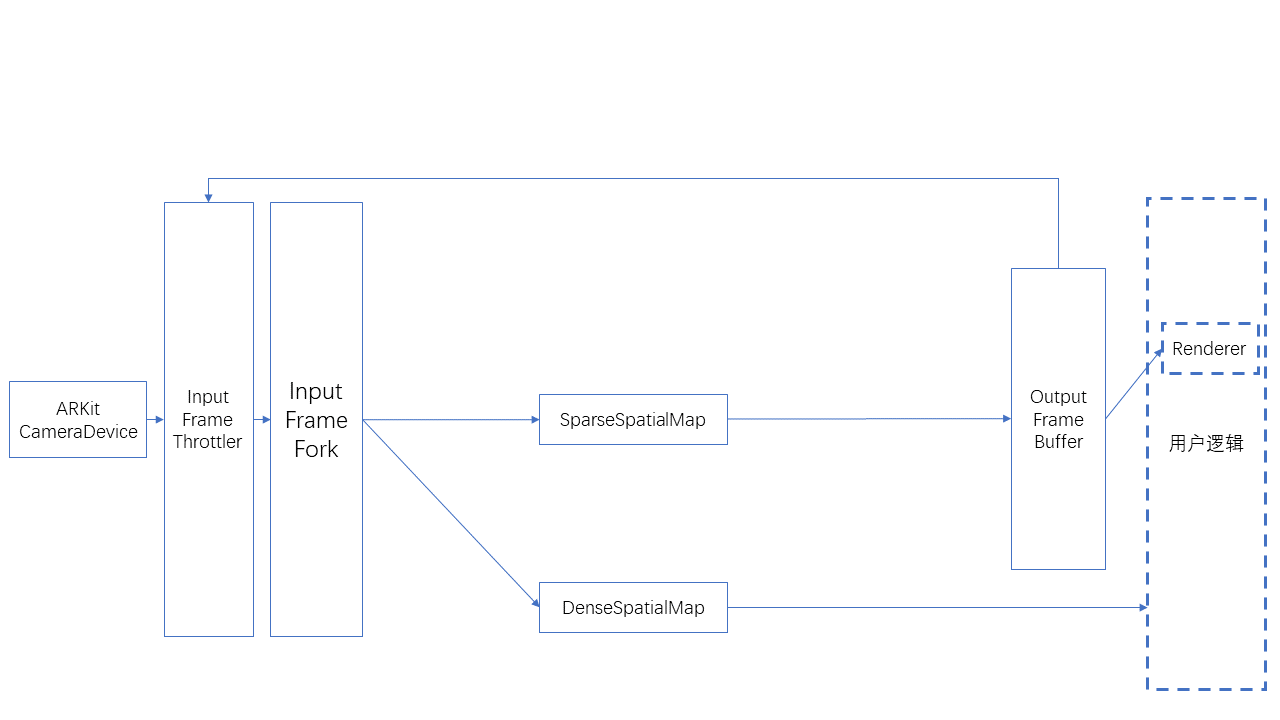
AR data flow
This article introduces the data flow in EasyAR Sense. EasyAR Sense uses componentized APIs, and components are connected through data flow.
Input and output data
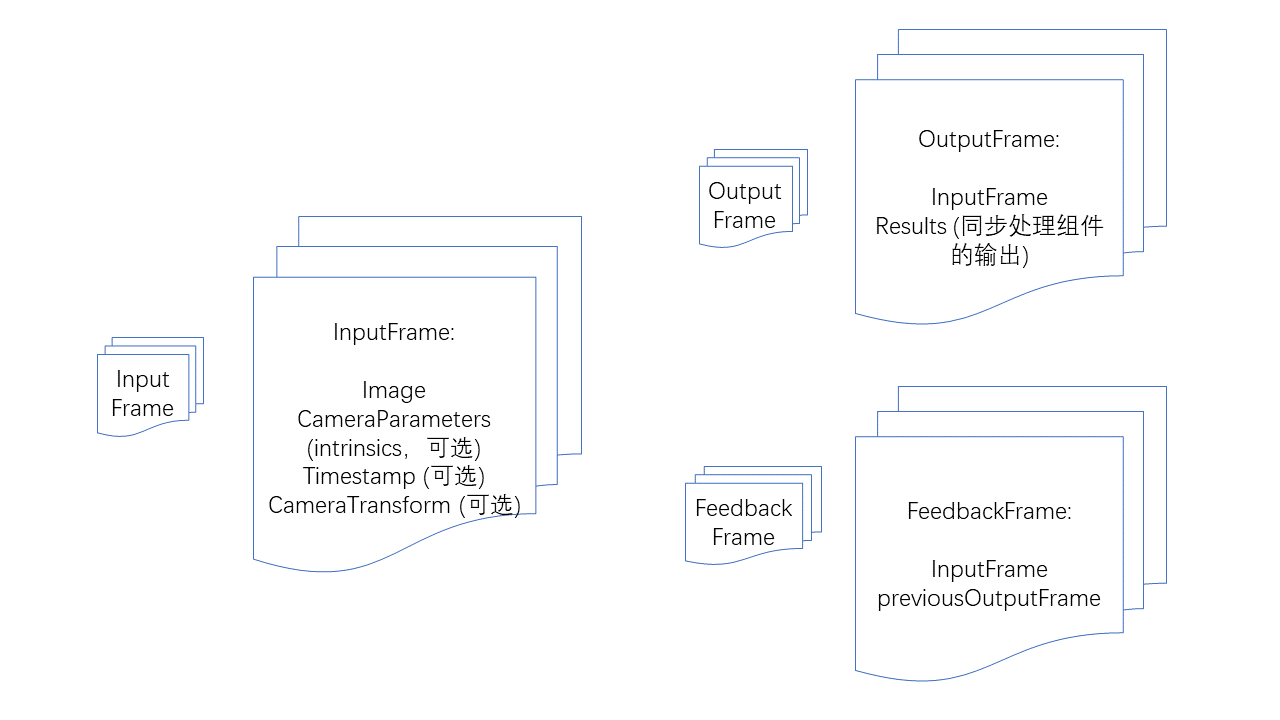
InputFrame: Input frame. It contains the image, camera parameters, timestamp, camera transform relative to the world coordinate system, and tracking status. Among them, camera parameters, timestamp, camera transform relative to the world coordinate system, and tracking status are optional, but specific algorithm components have specific requirements for input.
OutputFrame: Output frame. It contains the input frame and the output results of synchronous processing components.
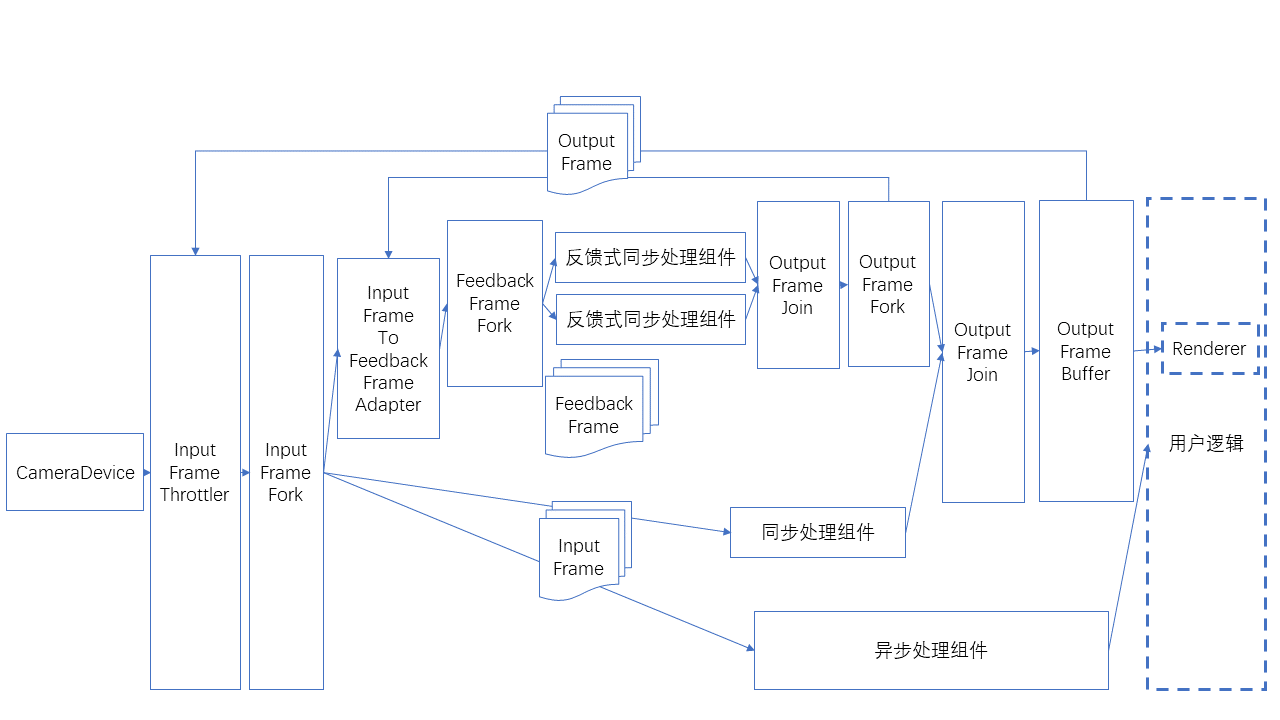
FeedbackFrame: Feedback frame. It contains an input frame and a historical output frame, and is used by feedback-style synchronous processing components such as ImageTracker.
Camera components
CameraDevice: Default camera on Windows, Mac, iOS, and Android.
ARKitCameraDevice: Default ARKit implementation on iOS.
ARCoreCameraDevice: Default ARCore implementation on Android.
MotionTrackerCameraDevice: Implements motion tracking and solves the device's 6DoF coordinates through multi-sensor fusion. (Android only)
ThreeDofCameraDevice: Adds 3DoF orientation on top of the default camera.
InertialCameraDevice: Adds 3DoF orientation and plane translation based on inertial estimation on top of the default camera.
custom camera device: Custom camera implementation.
Algorithm components
Feedback-style synchronous processing component: it needs to output results for each camera image frame and needs the previous frame's processing result to avoid mutual interference.
ImageTracker: implements detection and tracking of planar images.
ObjectTracker: implements detection and tracking of 3D objects.
Synchronous processing components: need to output results following the camera image on every frame.
SurfaceTracker: implements tracking of environmental surfaces.
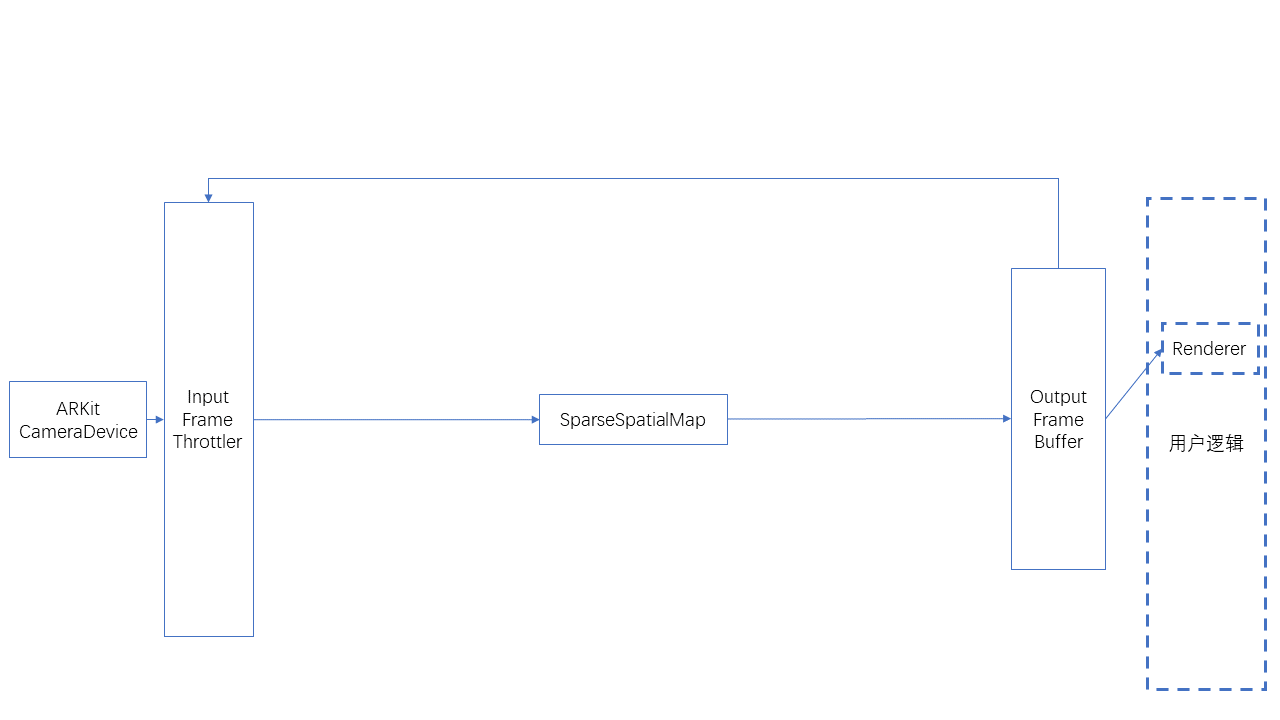
SparseSpatialMap: implements sparse spatial maps, providing the ability to scan physical space while generating point cloud maps and performing real-time localization.
MegaTracker: implements Mega spatial localization.
Asynchronous processing components: do not need to output results following the camera image on every frame.
CloudRecognizer: implements cloud recognition.
DenseSpatialMap: implements dense spatial maps, which can be used to implement effects such as collision and occlusion.
Component availability check
All components have an isAvailable function, which can be used to determine whether the component is available.
Cases where a component is unavailable include:
It is not implemented on the current operating system.
The dependencies required by the component do not exist, such as ARKit or ARCore.
The component does not exist in the current version (variant), for example when some features do not exist in certain trimmed-down versions.
The component is unavailable under the current License.
Before using a component, always check whether it is available and perform the corresponding fallback or prompt.
Data flow
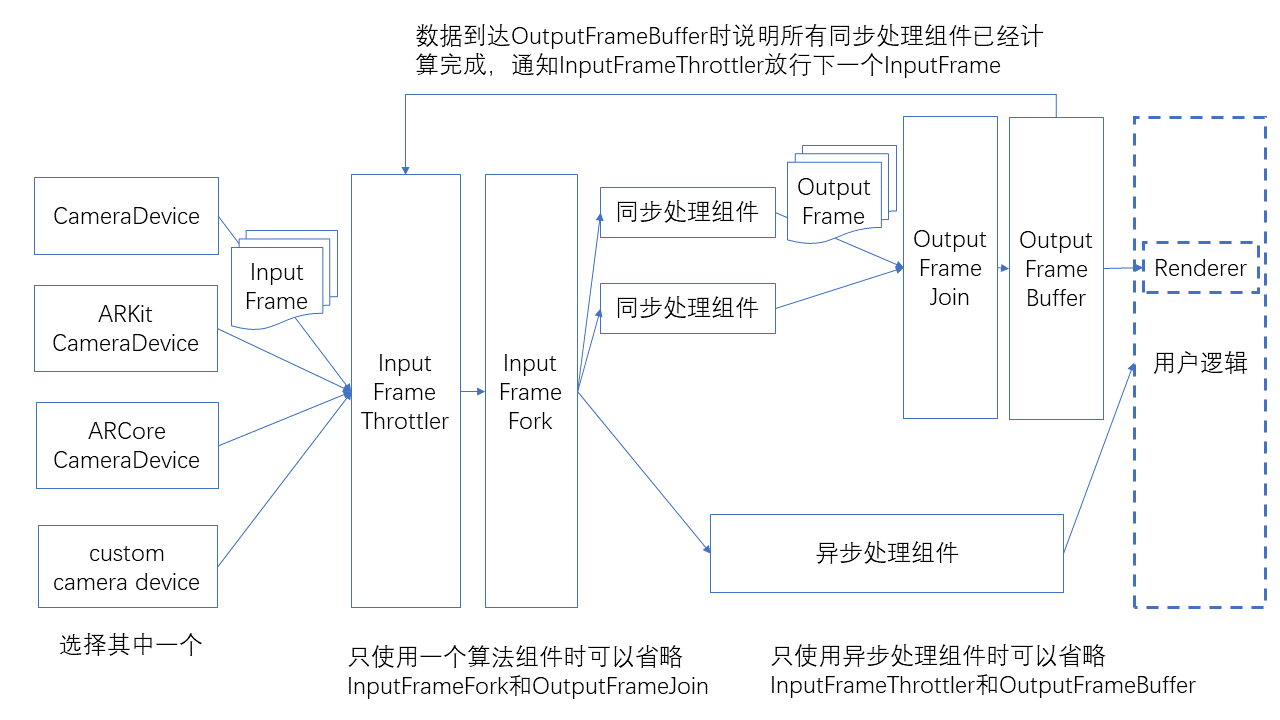
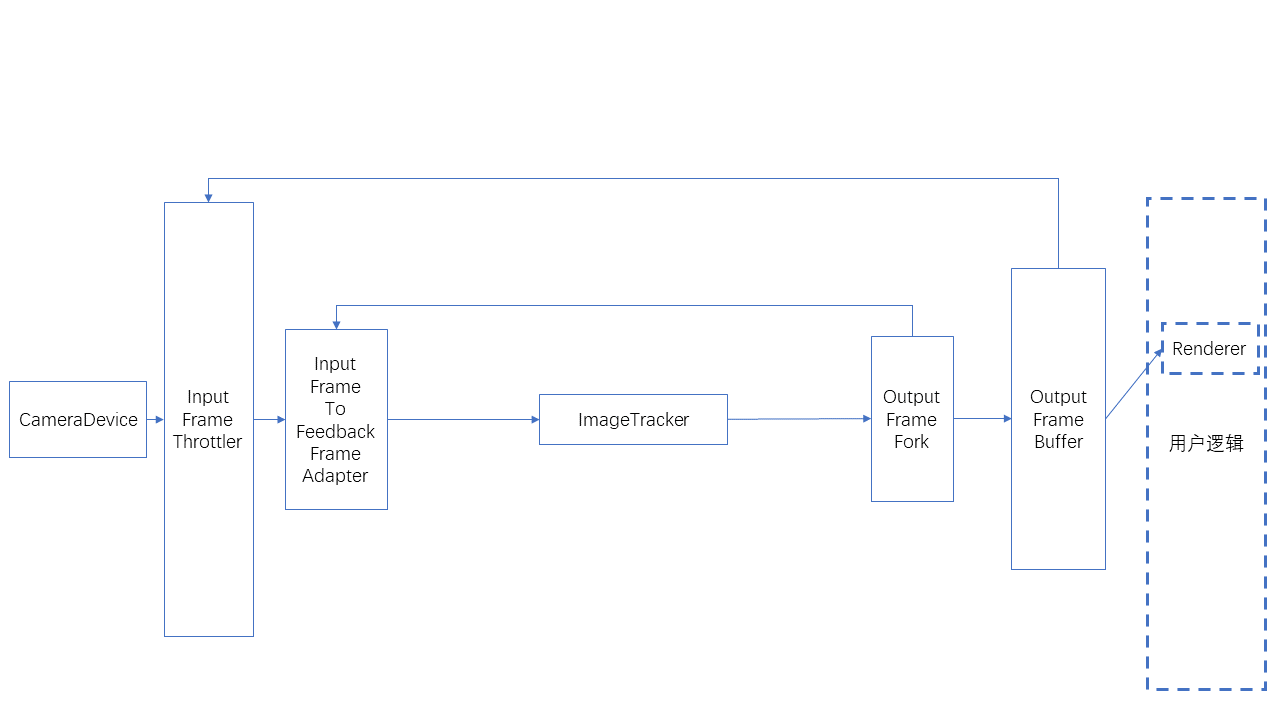
Components are connected as shown below.
There is a special usage where the input is a feedback frame, as shown below.
Data flow helper classes
Data flow sending and receiving ports. Each component needs to include these ports.
SignalSink / SignalSource: receives/sends a signal with no data.
InputFrameSink / InputFrameSource: receives/sends an InputFrame.
OutputFrameSink / OutputFrameSource: receives/sends an OutputFrame.
FeedbackFrameSink / FeedbackFrameSource: receives/sends an FeedbackFrame.
Branching and merging data flows
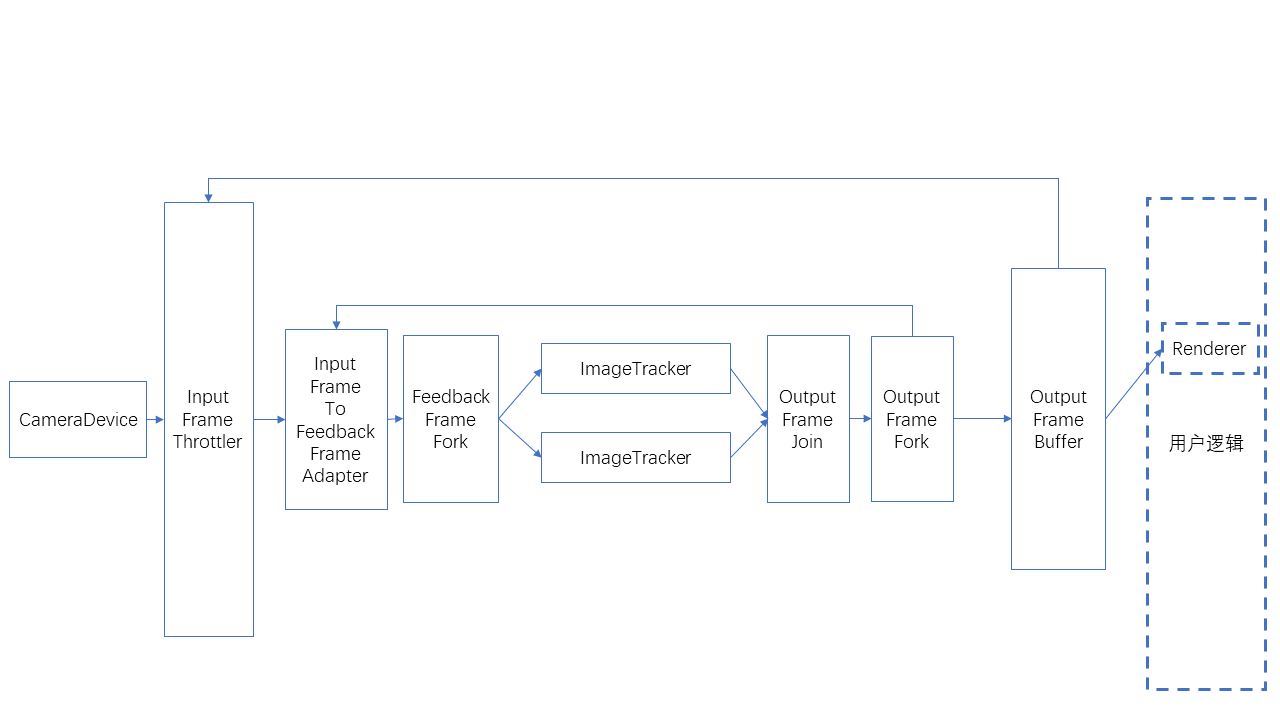
InputFrameFork: splits one InputFrame into multiple parallel outputs.
OutputFrameFork: splits one OutputFrame into multiple parallel outputs.
OutputFrameJoin: merges multiple OutputFrame into one and merges all results into Results. Note that its multiple input connections should not be connected while data is flowing in, otherwise it may enter a state where no output can be produced. It is recommended to complete data flow connections before Camera starts.
FeedbackFrameFork: splits one FeedbackFrame into multiple parallel outputs.
Data flow throttling and buffering
InputFrameThrottler: receives and sends InputFrame, but only sends one at a time. It sends the next InputFrame only after receiving a trigger signal. When multiple InputFrame are received, later InputFrame may overwrite earlier InputFrame.
OutputFrameBuffer: receives and buffers OutputFrame, waits for user polling, and can send a signal when an OutputFrame is received.
Connect the signal sent by OutputFrameBuffer to InputFrameThrottler to complete the entire throttling process.
Data flow conversion
InputFrameToOutputFrameAdapter: can directly wrap an InputFrame into an OutputFrame for rendering display.
InputFrameToFeedbackFrameAdapter: can wrap an InputFrame and an FeedbackFrame into an FeedbackFrame for feedback-style synchronized processing components.
Limit on the number of InputFrame
CameraDevice can set bufferCapacity, which is the maximum number of InputFrame instances it outputs. The current default value is 8.
Custom cameras can use BufferPool for implementation.
For the number of InputFrame instances required by each component, refer to the API documentation for each component.
If the number of InputFrame instances is insufficient, the data flow may get stuck and cause rendering to get stuck.
If the number of InputFrame instances is insufficient, there may also be a case where rendering does not get stuck on the first startup, but gets stuck after switching to the background or after pausing/starting components. Make sure tests cover this situation.
Connecting and disconnecting
Connecting and disconnecting while the data flow is running is not recommended.
If you need to connect or disconnect during runtime, note that this can only be done on a cut edge (after removing this edge, the data flow is divided into two parts). It cannot be done on an edge in a cycle (where the cycle means a cycle formed by edges when the data flow is viewed as an undirected graph), on the input of OutputFrameJoin, or on the sideInput of InputFrameThrottler. Otherwise, the data flow may get stuck at nodes such as OutputFrameJoin and InputFrameThrottler, preventing output.
All algorithm components have start/stop functionality. When stopped, frames are not processed, but they are still output from the component, only without results.
Typical usage
The following shows usage with a single ImageTracker, which can be used to recognize and track non-repeated planar image targets.
The following shows usage with a single ImageTracker, which can be used to recognize and track repeated planar image targets.
The following shows usage with SparseSpatialMap, which can be used to implement sparse spatial map building, localization, and tracking.
The following shows usage with SparseSpatialMap and DenseSpatialMap used together, which can be used to implement sparse spatial map building, localization, tracking, and dense spatial map generation.