Mega localization service
Mega Block Cloud Localization Service provides online, real-time spatial localization capability support for the device side. The device side runs your AR application. After session initialization is complete, it needs to obtain the initial camera pose through the cloud localization service. Then it combines the motion tracking capability of the local device and works together with the cloud localization results to continuously update the real-time pose information of the device, thereby meeting the application's requirements for higher robustness and a more realistic AR experience.
Cloud localization capability depends on real-time computation on the server side. While the AR application is running, the device needs to maintain a network connection so that it can obtain localization and pose computation results returned from the cloud through the network. By default, the cloud localization computing center is deployed in Shanghai, China. If you have higher requirements for network latency or stability, or if your AR product operates for overseas markets, we support deploying server nodes through dedicated-line acceleration, or deploying cloud localization resources in a nearby computing center to further optimize overall performance and user experience.
Block data flow
Preparation for Block cloud localization has three steps:
Collect and upload data and complete Block mapping
Generate the Block and store it in a repository
Add the required Block to the cloud localization database
flowchart LR

A[Block mapping] --> B>Block storage] --> C[Add map to cloud localization database]
After mapping is complete, the generated Block is automatically stored in the bound Block repository. For detailed operation steps of each step, refer to the following documents:
Cloud localization data flow
The device uploads device motion tracking data and image data to the cloud localization service, and the localized camera pose result is returned to the device.
The device side performs real-time fusion optimization on the camera pose again to drive real-time rendering and interaction.
If annotation data has been uploaded to the cloud localization database, the annotation data package will be downloaded to the device as an EMA annotation file, and 3D content at the annotation position will be rendered in real time.
flowchart TB

C[Cloud localization database] --> D[Device side]

D[Device side] --> C[Cloud localization database]
Preparation before starting
- Mega Block mapping has been completed
- At least one available Mega Block repository
- Ensure that the target Mega Block is in this repository and has a normal status
- Prepare an APIKey whose permissions allow Mega Block
- The device side requires a Sense license or WeChat Mini Program license (free trial available)
Note
To use an EasyAR Sense license on a headset device, you need to select the XR License Sense type
Quick start for cloud localization
Cloud localization service configuration steps are as follows:
- Purchase and create a cloud localization service group
- Associate the service group with the mapping project
- Create a cloud localization database in the cloud localization group
- Add Mega Block to the cloud localization database
Reference topic:
Create and purchase a cloud localization service group
This is a resource package required for cloud localization. The default package includes:
| Standard package item name | Standard | Trial |
|---|---|---|
| Project for mapping tasks | 1 | 1 |
| Cloud localization database | 5 | 2 |
| Request concurrency QPS | 10 | 3 |
Note
- As long as a request carries the AppId of the cloud localization database, it is counted in concurrent QPS regardless of whether localization succeeds.
- Cloud localization databases in the same cloud service group share QPS.
Additional standard package items
After the standard package exceeds the specified usage limit, further purchases are supported for expansion:
- Purchase additional cloud localization databases
- Purchase additional task association quota
- Expand the request concurrency QPS quantity
Note
After a paid user expires, Mega Block map files are retained for 3 months. If the files in the repository are still present, you can recreate a cloud localization database and add maps for use.
Reference topic:
Quickly verify the localization service
Mega supports quick verification after cloud localization service configuration is complete to ensure that the service is running normally and that the localization effect is normal.
The following figure shows a relatively quick and simple verification example: use a scene test photo prepared in front of the computer and localize against the photo off site. This can quickly verify that the localization service is available. As shown in the figure, the green Localize color at the bottom indicates successful localization.
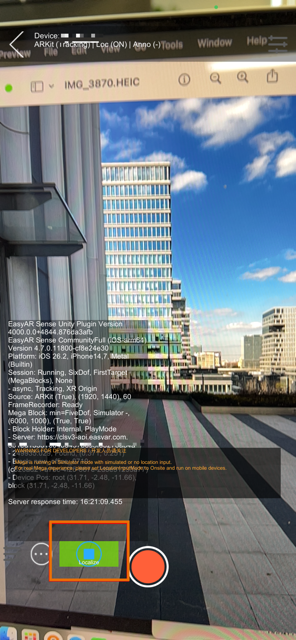
Quick verification
Mega Toolbox verifies that the localization service configuration is complete. It supports simulated verification on native App, WeChat Mini Program, or Unity. Verification can be divided into the following methods.
- Off-site quick verification based on Mega Toolbox
- On-site quick verification based on Mega Toolbox
- Quick verification based on Mega Studio simulation
Verify localization effect
- First use Mega Studio to annotate Mega Block data
- Verify the localization effect on site through Mega Toolbox
Reference topic for quick verification: